Quick Start
Update to the latest version
- Check the current version
- Run an update script
Prepare a template app
Create a new EAP by copying from a template EAP
- runtoolkit and sdk_home
- Launch the EDGEMATRIX Stream Toolkit application
- Create a new EAP
- Select the EAP
Validate the new EAP
- Open a validation dialog
- Run a validation
- Use your own sample siginal to validate
Test the new EAP
- Execute, Choose a stream and Create an EAP package
- Play a pipeline
- Stop a pipeline
- Movie files made by record actions
Update to the latest version
Before starting, please update to the latest version.
Check the current version
Run the following command to check the currently installed version.
$ apt show python3-edgematrix-stream-toolkit
  Package: python3-edgematrix-stream-toolkit
  Version: 2.0.1b1-1
  Priority: optional
  Section: python
  Source: edgematrix-stream-toolkit
  Maintainer: Takenori Sato <tsato@edgematrix.com>
  Installed-Size: 310 kB
  Depends: python3-boto3, python3-gpg, python3-pycryptodome, python3-pysnmp4, python3-requests, python3:any (>= 3.3.2-2~), edgematrix-stream (>= 2.3.1), edgematrix-stream (<< 3.0), python3-emisecurity (>= 2.0.1), python3-emitools (>= 1.0.5), meson, python3-libnvinfer-dev, uff-converter-tf
  Homepage: https://github.com/edge-ai/EdgeStreamSDK
  Download-Size: 41.2 kB
  APT-Manual-Installed: yes
  APT-Sources: https://apt.console.edgematrix.com/airbase/apt/debian r32.4/main arm64 Packages
  Description: EDGEMATRIX Stream Toolkit allows an AI model developer to build, test, and package an EAP (EDGEMATRIX Stream Application Package).
In the example above, the version is 1.5.1b0-1.
Run an update script
Run the following command to try updating to the latest version.
/mnt/nvme/toolkit_home$ cd bin/
/mnt/nvme/toolkit_home/bin$ ./update_toolkit.sh
upgrading to
[sudo] password for nvidia:

a local proxy is launching...
a local proxy is launching...
Hit:1 http://ppa.launchpad.net/aleksander-m/modemmanager-bionic/ubuntu bionic InRelease
Hit:2 http://ports.ubuntu.com/ubuntu-ports bionic InRelease
Hit:3 https://repo.download.nvidia.com/jetson/common r32.4 InRelease
Hit:4 http://ports.ubuntu.com/ubuntu-ports bionic-updates InRelease
Get:5 https://apt.console.edgematrix.com/airbase/apt/debian r32.4 InRelease [2,408 B]
Hit:6 http://ports.ubuntu.com/ubuntu-ports bionic-backports InRelease
Hit:7 http://ports.ubuntu.com/ubuntu-ports bionic-security InRelease
Hit:8 https://packagecloud.io/github/git-lfs/ubuntu bionic InRelease
Fetched 2,408 B in 2s (1,019 B/s)
Reading package lists... Done
Building dependency tree
Reading state information... Done
347 packages can be upgraded. Run 'apt list --upgradable' to see them.
Reading package lists... Done
Building dependency tree
Reading state information... Done
python3-edgematrix-stream-toolkit is already the newest version (2.0.1b1-1).
0 upgraded, 0 newly installed, 0 to remove and 347 not upgraded.
Reading package lists... Done
Building dependency tree
Reading state information... Done
0 upgraded, 0 newly installed, 0 to remove and 347 not upgraded.
Note that Get:5 https://apt.console.edgematrix.com/airbase/apt/debian r32.4 InRelease is the private APT repository by EDGEMATRIX that can be accessed only an authorized device.
In the example above, the sdk was confirmed as the latest version.
Prepare a template app
Each template has prepare_resource.sh that copies and compiles libraries, and generates an engine file to setup everything needed to run a particular app on your toolkit box.
An engine file varies by a version of CUDA, TensorRT, and GPU architecture. So please make sure to run the prepare_resource.sh script whenever necessary.
For example, this is how to prepare EMI Pedestrian DCF Counter.
/mnt/nvme/toolkit_home/bin$ cd ..
/mnt/nvme/toolkit_home$ cd templates/
/mnt/nvme/toolkit_home/templates$ cd EMI\ Pedestrian\ DCF\ Counter/resource/
/mnt/nvme/toolkit_home/templates/EMI Pedestrian DCF Counter/resource$ ./prepare_resource.sh
copying the tracker library...
generating engine files...
Setting pipeline to PAUSED ...

Using winsys: x11
Creating LL OSD context new
gstnvtracker: Loading low-level lib at libnvds_nvdcf.so
gstnvtracker: Optional NvMOT_RemoveStreams not implemented
gstnvtracker: Batch processing is ON
[NvDCF] Initialized
0:00:04.019217623  9627   0x55938b4610 INFO                 nvinfer gstnvinfer.cpp:559:gst_nvinfer_logger:<nvinfer0> NvDsInferContext[UID 1]:useEngineFile(): Loading Model Engine from File
Pipeline is PREROLLING ...
Got context from element 'eglglessink0': gst.egl.EGLDisplay=context, display=(GstEGLDisplay)NULL;
Opening in BLOCKING MODE
NvMMLiteOpen : Block : BlockType = 261
NVMEDIA: Reading vendor.tegra.display-size : status: 6
NvMMLiteBlockCreate : Block : BlockType = 261
Creating LL OSD context new
Pipeline is PREROLLED ...
Setting pipeline to PLAYING ...
New clock: GstSystemClock
Got EOS from element "pipeline0".
Execution ended after 0:00:00.005020126
Setting pipeline to PAUSED ...
Setting pipeline to READY ...
Setting pipeline to NULL ...
Freeing pipeline ...
Create a new EAP by copying from a template EAP
At first, let’s explore a command line program and the main directory you work on. Then, launch the EDGEMATRIX Stream Toolkit application, and create a new EAP application from one of templates.
runtoolkit and toolkit_home
The command line program to launch the toolkit application is runtoolkit.
And the main directory you work on is toolkit_home, which is mounted on a secondary drive.
/mnt/nvme/toolkit_home$ runtoolkit --help
usage: EDGEMATRIX Stream Toolkit [-h] [--verbose] [--timeout TIMEOUT]
                                 [-d DEVICEID] [-s SECRETKEY]
                                 toolkit_home

positional arguments:
  toolkit_home          A folder path of the toolkit_home

optional arguments:
  -h, --help            show this help message and exit
  --verbose, -v         if set, the logging level is set as DEBUG
  --timeout TIMEOUT, -t TIMEOUT
                        A timeout in seconds for a pipeline to start
  -d DEVICEID, --deviceid DEVICEID
                        use this deviceid if set
  -s SECRETKEY, --secretkey SECRETKEY
                        use this secret key if set
Launch the EDGEMATRIX Stream Toolkit application
Launch the EDGEMATRIX Stream Toolkit application by executing runtoolkit.
nvidia@nvidia-desktop:/mnt/nvme/toolkit_home$ runtoolkit ./
Then, the following window will be shown.
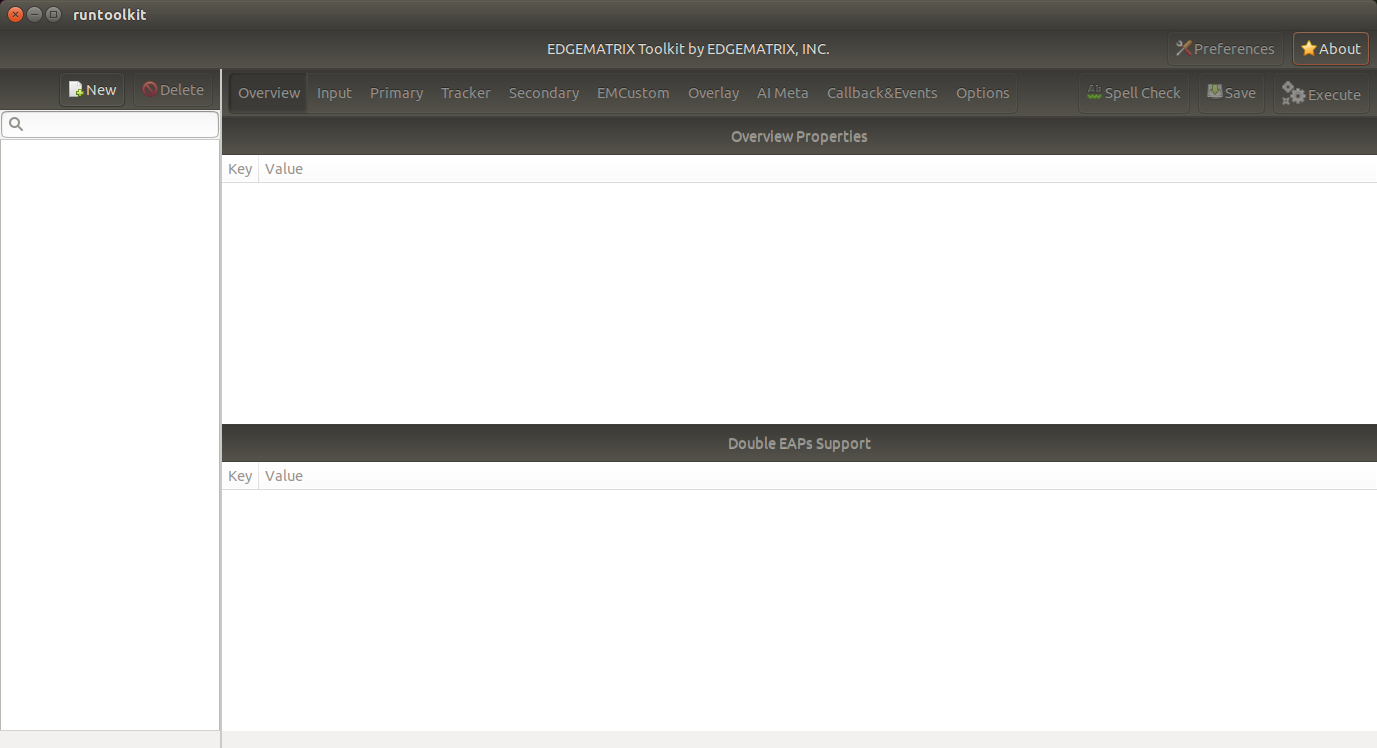
By clicking About button, you can check the version.
Now this time, let’s create a new applicatoin that counts a vehicle by car color.
Create a new EAP
Press New, then you will see a dialog below.
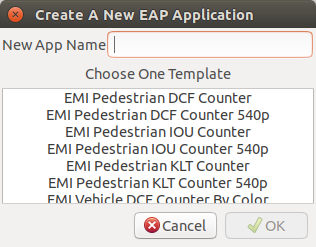
Then, enter “My First Vehicle Counter”, select EMI Vehicle DCF Counter By Color, then click OK.
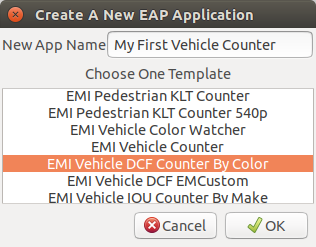
This will copy the template to create your application. Now the Toolkit window shows your application as follows.
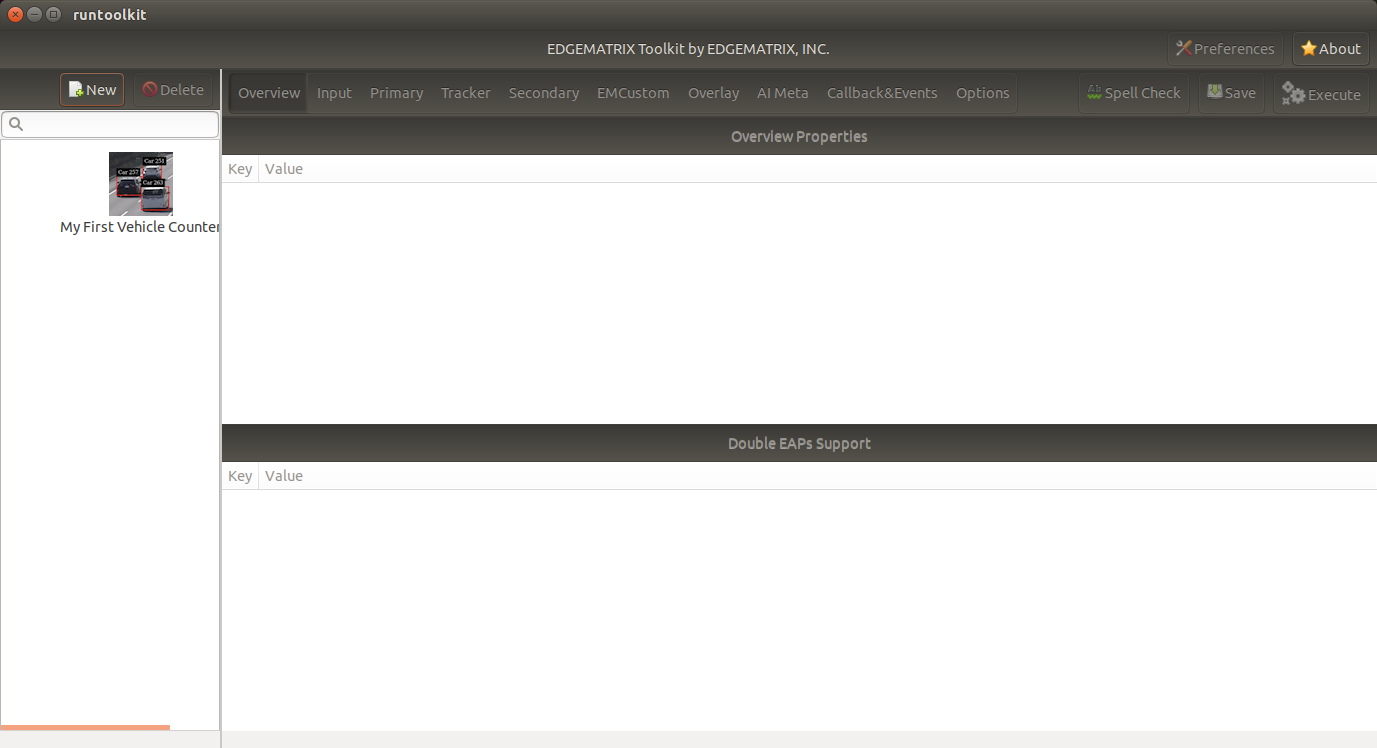
As below, your application folder contains exactly the same structure as the copied template folder.
/mnt/nvme/toolkit_home$ diff applications/My\ First\ Vehicle\ Counter/ templates/EMI\ Vehicle\ DCF\ Counter\ By\ Color/
Common subdirectories: applications/My First Vehicle Counter/resource and templates/EMI Vehicle DCF Counter By Color/resource
Select a new EAP
Now let’s select the newly created EAP application in the sidebar.
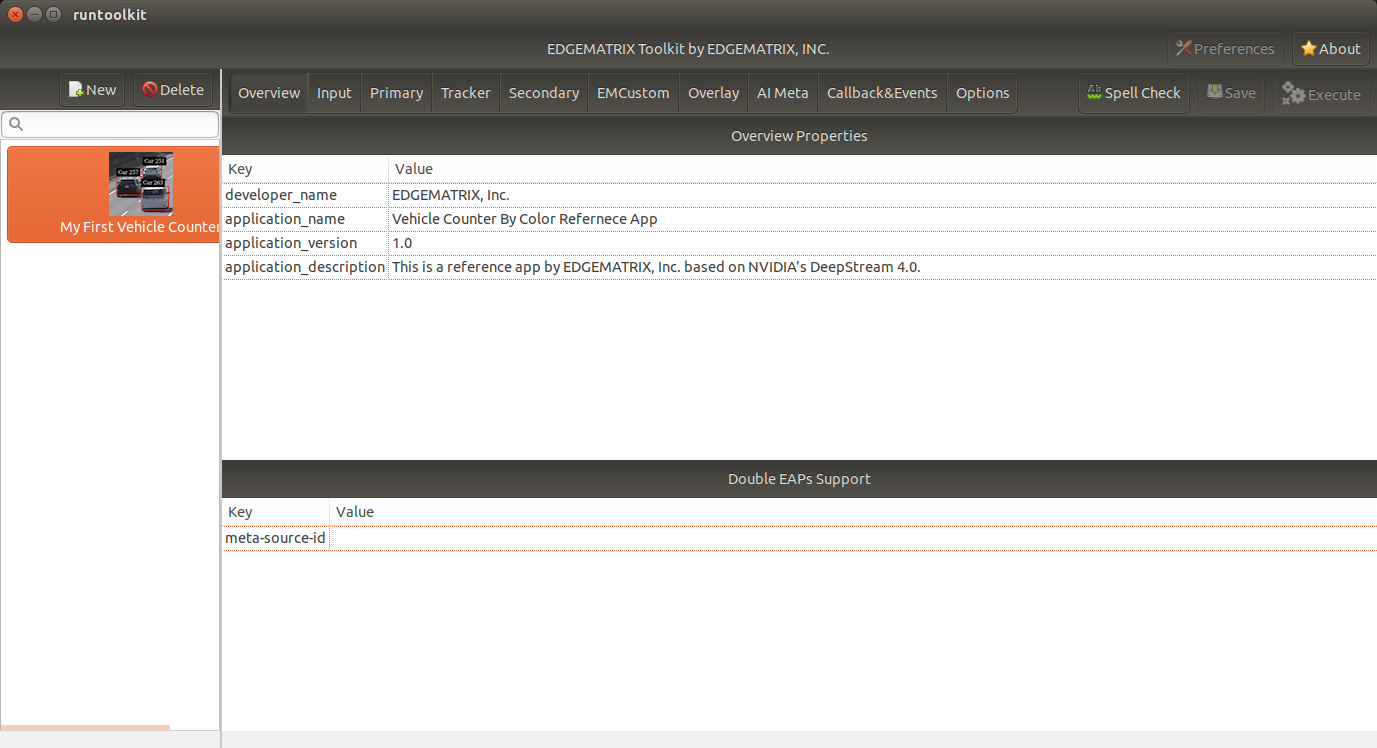
Then, it will show you all the configurations.
By clicking each of configuration groups, you can see its detail.
For example, you can see the followings when you click Callback&Events.
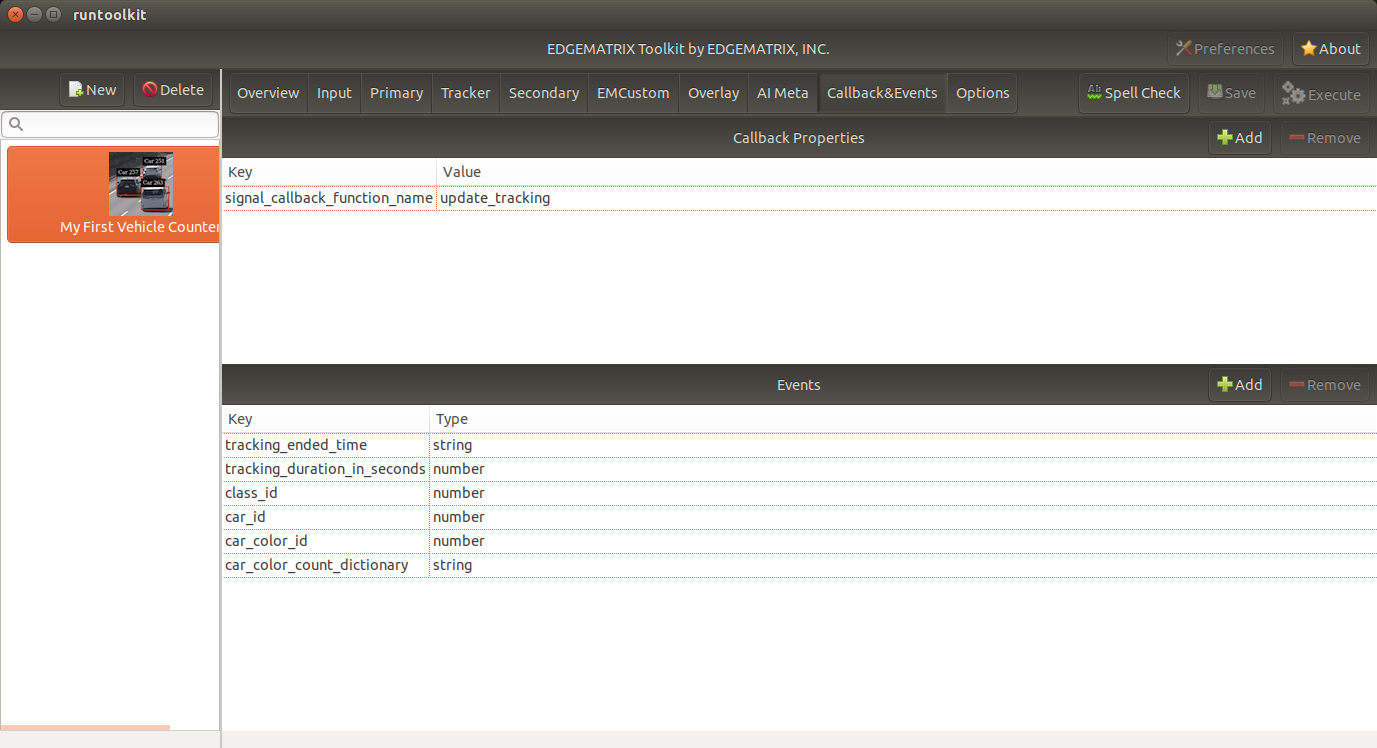
Let’s check what’s inside the new application folder.
/mnt/nvme/toolkit_home$ ls -l applications/My\ First\ Vehicle\ Counter/
total 32
-rw-r--r-- 1 nvidia nvidia  6764 Jun 11 12:47 emi_signal_callback.py
-rw-r--r-- 1 nvidia nvidia  1535 Jun 11 08:57 emi_stream_config.json
-rw-r--r-- 1 nvidia nvidia 13271 May 12 08:44 icon.png
drwxr-xr-x 3 nvidia nvidia  4096 Jun 11 08:43 resource
/mnt/nvme/toolkit_home$ ls -lR applications/My\ First\ Vehicle\ Counter/
'applications/My First Vehicle Counter/':
total 32
-rw-r--r-- 1 nvidia nvidia  6764 Jun 11 12:47 emi_signal_callback.py
-rw-r--r-- 1 nvidia nvidia  1535 Jun 11 08:57 emi_stream_config.json
-rw-r--r-- 1 nvidia nvidia 13271 May 12 08:44 icon.png
drwxr-xr-x 3 nvidia nvidia  4096 Jun 11 08:43 resource

'applications/My First Vehicle Counter/resource':
total 3584
-rw-r--r-- 1 nvidia nvidia    3320 May 13 07:35 dstest1_pgie_config_debug.txt
-rw-r--r-- 1 nvidia nvidia    3336 May 13 07:35 dstest1_pgie_config.txt
-rw-r--r-- 1 nvidia nvidia    3496 May 13 07:36 dstest2_sgie1_config_debug.txt
-rw-r--r-- 1 nvidia nvidia    3512 May 13 07:36 dstest2_sgie1_config.txt
-rw-r--r-- 1 nvidia nvidia 3638560 Jun 11 14:40 libnvds_nvdcf.so
drwxr-xr-x 4 nvidia nvidia    4096 Jun 11 14:40 models
-rwxr-xr-x 1 nvidia nvidia     481 May 13 08:19 prepare_resource.sh
-rw-r--r-- 1 nvidia nvidia    1684 May 12 08:44 tracker_config.yml

'applications/My First Vehicle Counter/resource/models':
total 8
drwxr-xr-x 2 nvidia nvidia 4096 Jun 11 14:45 Primary_Detector
drwxr-xr-x 2 nvidia nvidia 4096 Jun 11 14:43 Secondary_CarColor

'applications/My First Vehicle Counter/resource/models/Primary_Detector':
total 13880
-rwxr-xr-x 1 nvidia nvidia    1126 Jun 11 14:40 cal_trt.bin
-rwxr-xr-x 1 nvidia nvidia      28 Jun 11 14:40 labels.txt
-rwxr-xr-x 1 nvidia nvidia 6244865 Jun 11 14:40 resnet10.caffemodel
-rw-r--r-- 1 nvidia nvidia 7949145 Jun 11 14:45 resnet10.caffemodel_b1_fp16.engine
-rwxr-xr-x 1 nvidia nvidia    7605 Jun 11 14:40 resnet10.prototxt

'applications/My First Vehicle Counter/resource/models/Secondary_CarColor':
total 17660
-rwxr-xr-x 1 nvidia nvidia    2078 Jun 11 14:40 cal_trt.bin
-rwxr-xr-x 1 nvidia nvidia      71 Jun 11 14:40 labels.txt
-rwxr-xr-x 1 nvidia nvidia  150543 Jun 11 14:40 mean.ppm
-rwxr-xr-x 1 nvidia nvidia 9017648 Jun 11 14:40 resnet18.caffemodel
-rw-r--r-- 1 nvidia nvidia 8887410 Jun 11 14:43 resnet18.caffemodel_b16_fp16.engine
-rwxr-xr-x 1 nvidia nvidia   14058 Jun 11 14:40 resnet18.prototxt
Please note for now that this application uses trained model binaries as they are. You will see later how they are protected as an EAP package.
Validate the new EAP
In a real project, you will customize this app as needed. Then, once ready, the first thing to try is to validate if it is valid.
Open a validation dialog
Press Spell Check button, which may sound odd, but anyway, then, you will see a dialog as below.
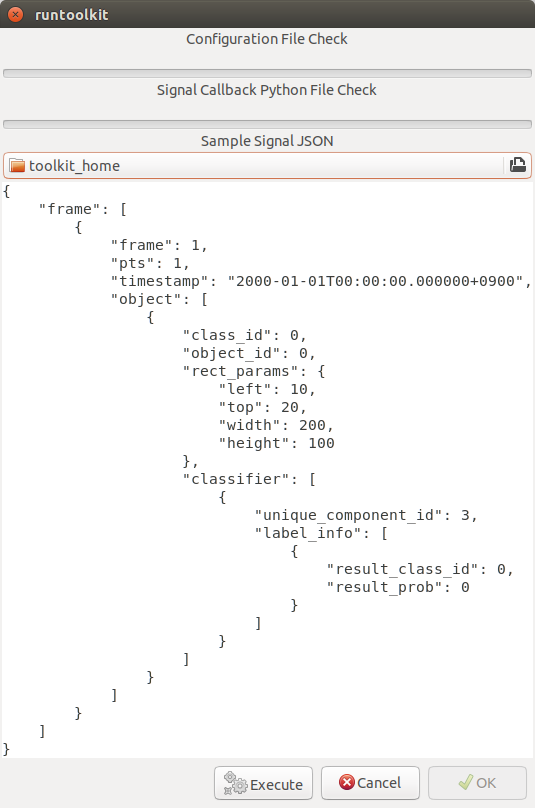
This shows two check results not shown yet and the sample signal json to test the callback function.
Run a validation
Press Execute, and see the results.
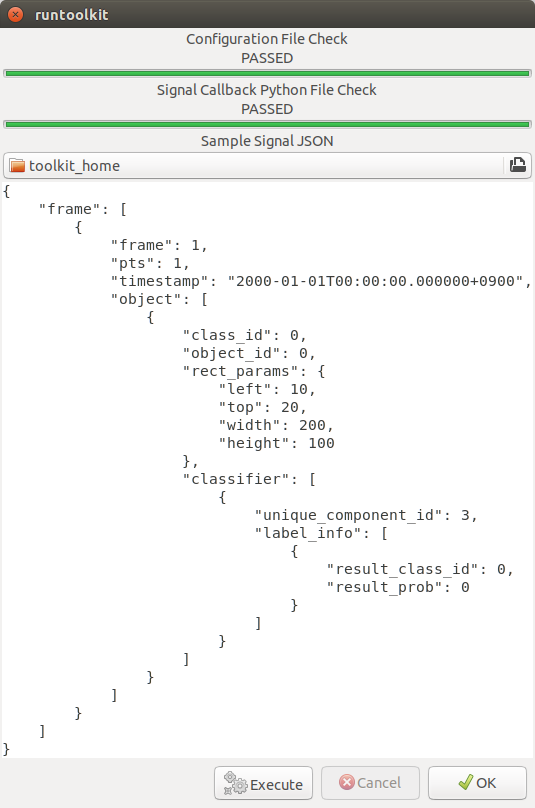
Nothing is customized yet, so it should pass as above.
Use your own sample siginal to validate
But, if you have customized your callback, then, you are likely to test a different sample json. In such a case, you can write your own sample, then use it for this validation.
Click the file chooser, select your file, then, you are ready to validate with your own sample as below.
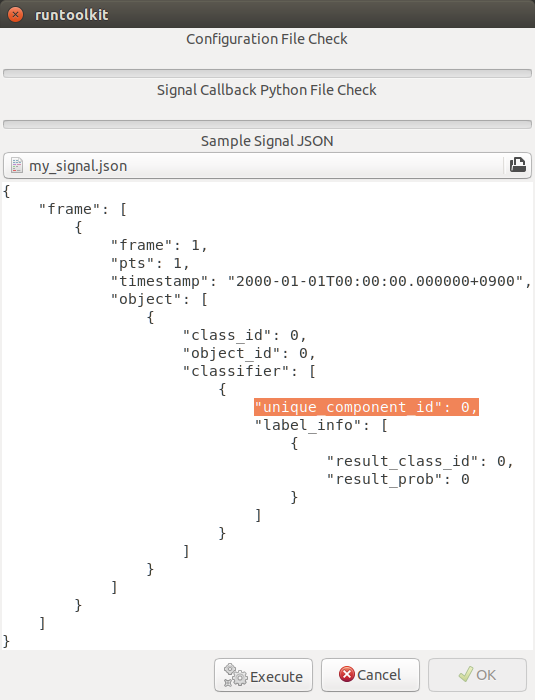
In this case, the value of unique_component_id was changed.
Test the new EAP
If you pass the validation, Execute button becomes active for you to run your application.
Execute, Choose a stream and Create an EAP package
By clicking the Execute button, it will show you an execution dialog.
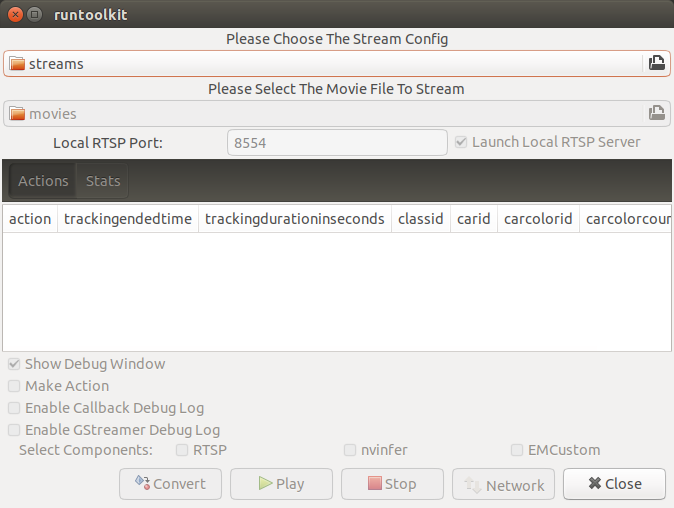
At first, you need to choose a stream where your application will run.
By default, streams folder of the toolkit home directory is chosen.
Click the file chooser, open the vehicle_stream folder, then select vehicle_counter_stream_configuration.json.
The streams folder and the movies folder look as below.
/mnt/nvme/toolkit_home$ ls -l streams/
total 52
drwxr-xr-x 2 nvidia nvidia 4096 Jun 11 08:49 doubleeap_emcustom
drwxr-xr-x 2 nvidia nvidia 4096 May 13 04:13 face_net
drwxr-xr-x 2 nvidia nvidia 4096 Jun 11 08:50 line_stream
drwxr-xr-x 2 nvidia nvidia 4096 May 12 08:44 no_app_stream
drwxr-xr-x 5 nvidia nvidia 4096 Jun 18 12:03 pedestrian_stream
drwxr-xr-x 2 nvidia nvidia 4096 Jun 11 08:43 pedestrian_stream_bottomleft
drwxr-xr-x 2 nvidia nvidia 4096 Jun 11 08:43 pedestrian_stream_upperleft
drwxr-xr-x 2 nvidia nvidia 4096 Jun 11 08:43 pedestrian_stream_upperright
drwxr-xr-x 2 nvidia nvidia 4096 Jun 11 08:52 snmp_stream
drwxr-xr-x 5 nvidia nvidia 4096 Jun 11 12:33 vehicle_colorwatcher_stream
drwxr-xr-x 5 nvidia nvidia 4096 Jun 18 12:24 vehicle_stream
drwxr-xr-x 2 nvidia nvidia 4096 May 13 09:50 yolo_stream
drwxr-xr-x 2 nvidia nvidia 4096 Jun 11 08:43 yolo_stream_bottomright
/mnt/nvme/toolkit_home$ ls -l movies/
total 644332
-rw-r--r-- 1 nvidia nvidia 129384358 May 13 08:36 ChuoHwy-720p-faststart.mp4
-rw-r--r-- 1 nvidia nvidia 251927313 May 13 08:36 Park-FHD@30p-4MBs-faststart.mp4
-rw-r--r-- 1 nvidia nvidia 278477073 May 13 08:35 Street-FHD@30p-4MBs-faststart.mp4
Next, choose a movie file to use as a local RTSP streaming as below.
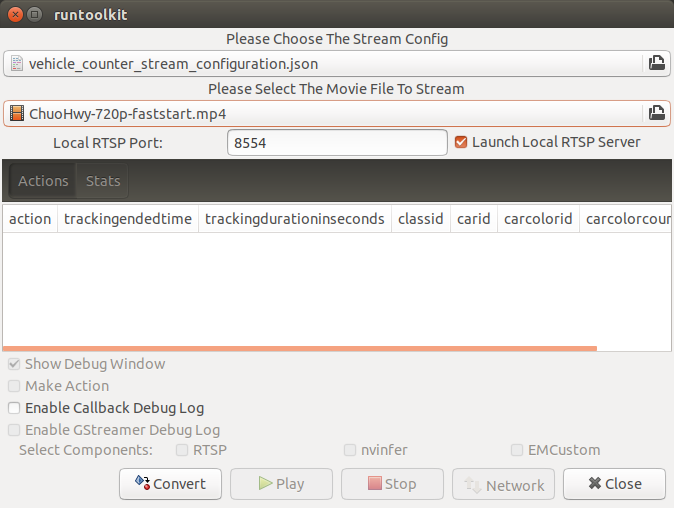
Now, Convert button becomes active for you to make an EAP package in the chosen stream folder.
Press the Convert button, then a popup window to enter a passphrase is shown.
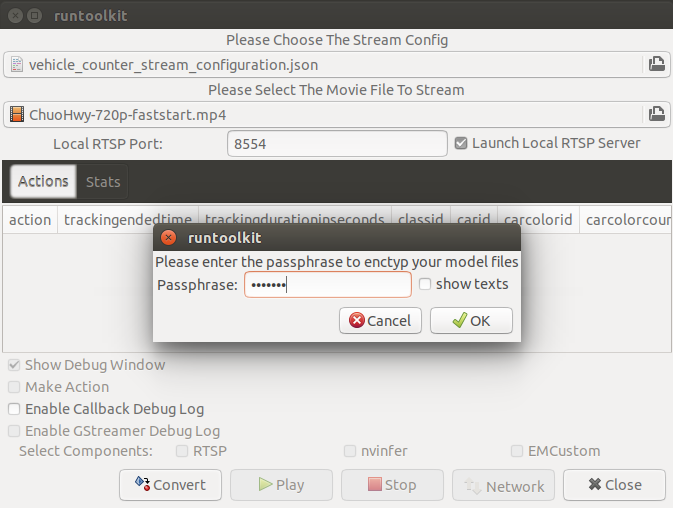
It is the passphrase to protect your model binary. An EAP will be encrypted by the private key of each target device, and placed safely on an encrypted secondary drive of the target device, which is futher protected by a secureboot from its root and whose root user is not exposed. But, the last protection of your precious model binary is this passphrase. So, please choose carefully when you make your submission package.
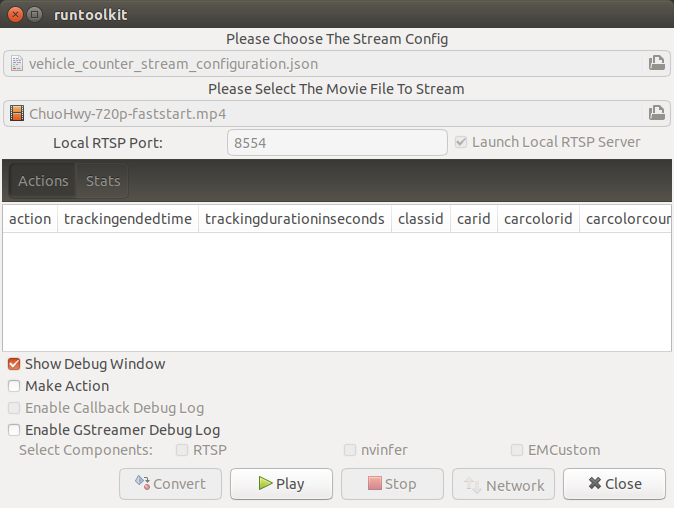
Enter your passphrase, press OK, then the packaging task will run for a while as a spinner is shown.
The dialog window will looks as below once completes.
Play a pipeline
Now you are ready to run your application in the stream.
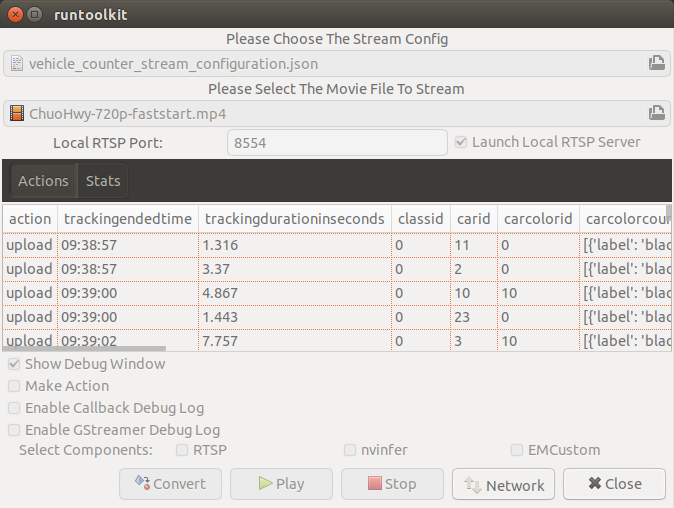
Click Play button, and wait for a few seconds, you’ll see events are getting generated and passed as actions.
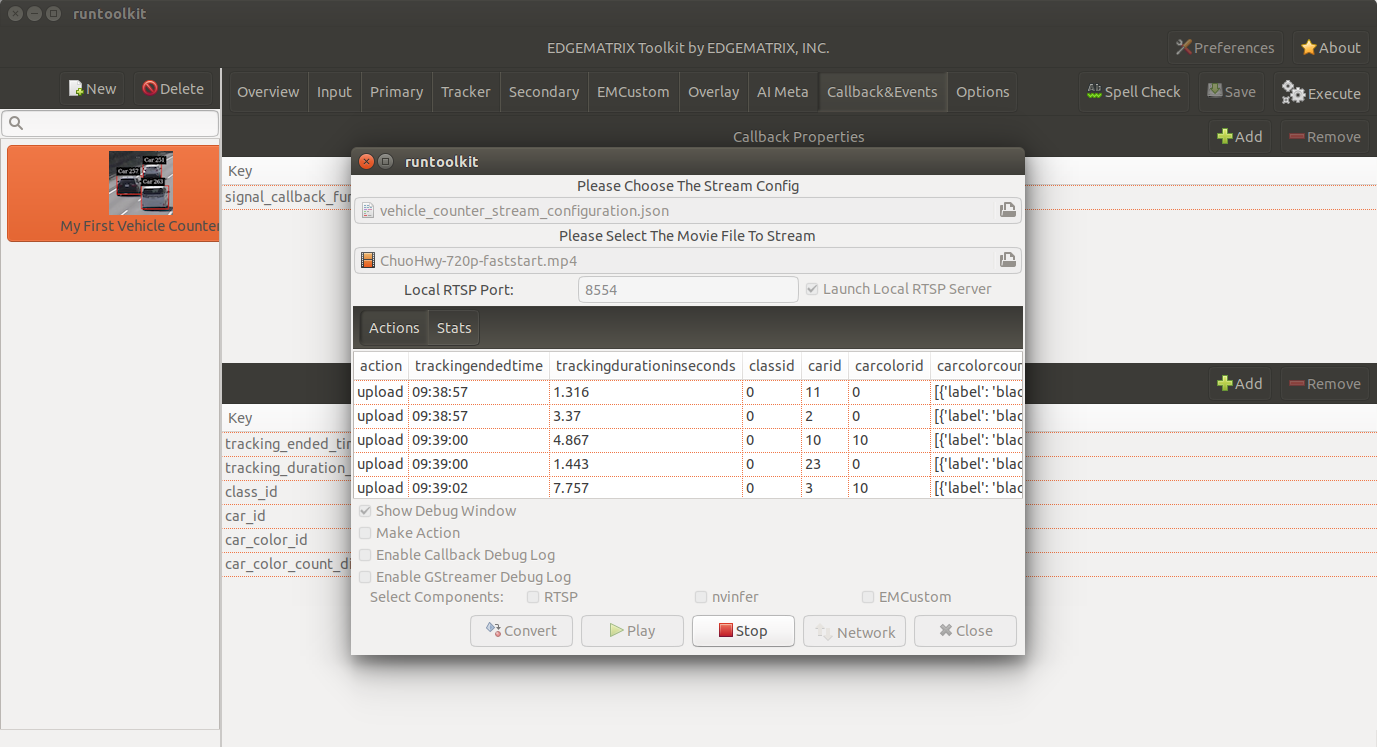
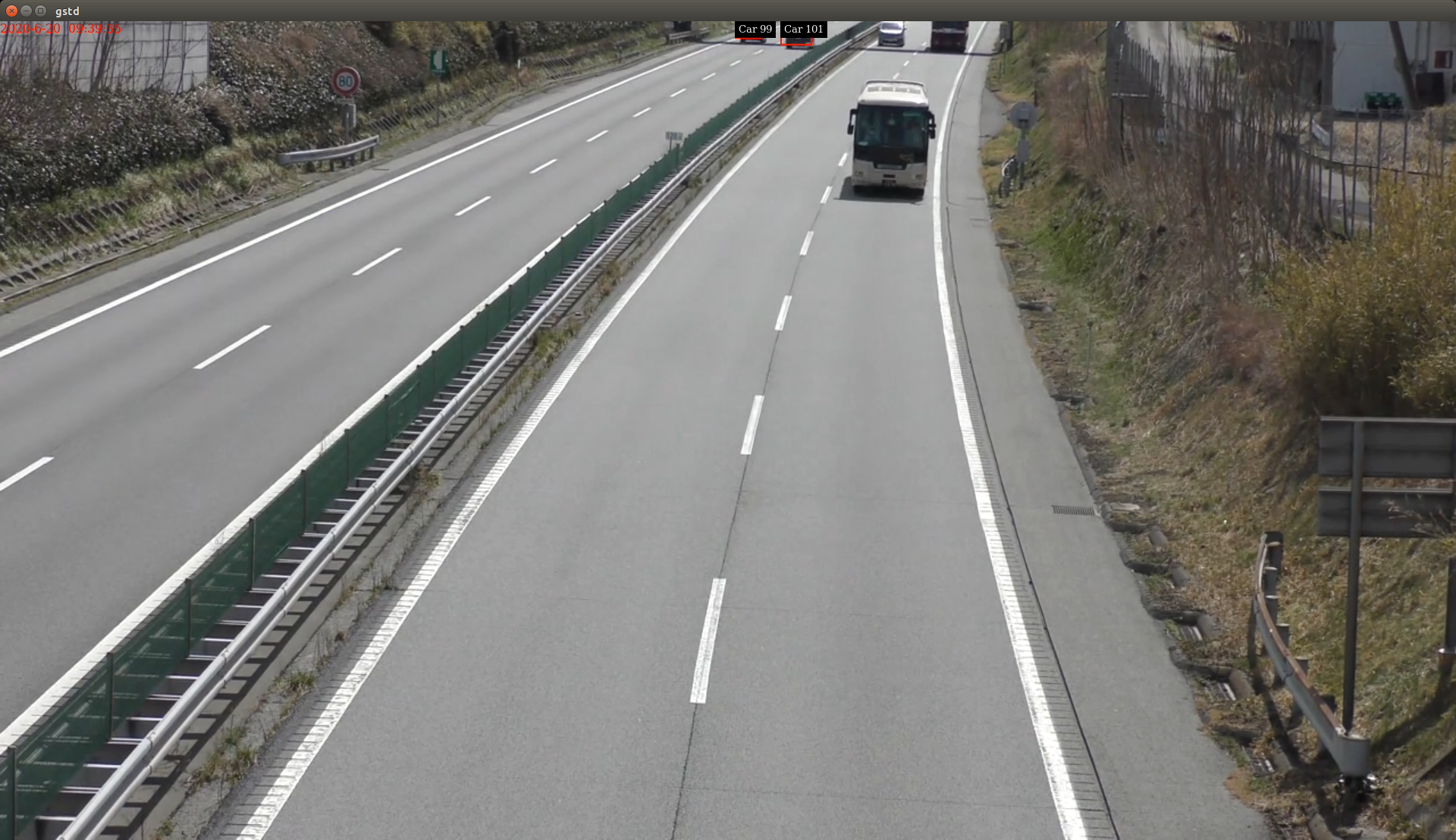
Note that Show Debug Window is checked. The debug window is shown, too.
Let’s check the EAP package built. An agent process is already up and running, so has already extracted the EAP package in the uncompressed_files folder.
/mnt/nvme/toolkit_home$ ls -l streams/vehicle_stream/
total 48004
drwxr-xr-x 2 nvidia nvidia     4096 Jun 11 14:36 continuous-recordings
-rw-r--r-- 1 nvidia nvidia     4220 Jun 20 09:40 gstd.log
drwxr-xr-x 2 nvidia nvidia     4096 Jun 20 09:39 prerecordings
-rw-r--r-- 1 nvidia nvidia 15863016 Jun 20 09:46 stream.log
drwxr-xr-x 3 nvidia nvidia     4096 Jun 20 09:46 uncompressed_files
-rw-r--r-- 1 nvidia nvidia     1264 Jun 20 09:13 vehicle_counter_stream_configuration.json
-rw-r--r-- 1 nvidia nvidia     1515 Jun 20 09:13 vehicle_counter_stream_configuration_with_options.json
-rw-r--r-- 1 nvidia nvidia 33256729 Jun 20 09:46 vehicle_counter.zip
/mnt/nvme/toolkit_home$ ls -l streams/vehicle_stream/uncompressed_files/
total 4
drwxr-xr-x 3 nvidia nvidia 4096 Jun 20 09:46 vehicle_stream_18135
/mnt/nvme/toolkit_home$ ls -l streams/vehicle_stream/uncompressed_files/vehicle_stream_18135/
total 32
-rw-r--r-- 1 nvidia nvidia  6764 Jun 20 09:46 emi_signal_callback.py
-rw-r--r-- 1 nvidia nvidia  1535 Jun 20 09:46 emi_stream_config.json
-rw-r--r-- 1 nvidia nvidia 13271 Jun 20 09:46 icon.png
drwxr-xr-x 3 nvidia nvidia  4096 Jun 20 09:46 resource
The folder structure exactly the same as the one of the application folder as you have seen.
But there are a couple of exceptions. All the trained binaries and related files are encrypted.
You can tell by a file extention. Files with .gpg are encrypted with GnuPG.
/mnt/nvme/toolkit_home$ ls -l streams/vehicle_stream/uncompressed_files/vehicle_stream_18135/resource/models/
total 8
drwxr-xr-x 2 nvidia nvidia 4096 Jun 20 09:46 Primary_Detector
drwxr-xr-x 2 nvidia nvidia 4096 Jun 20 09:46 Secondary_CarColor
/mnt/nvme/toolkit_home$ ls -l streams/vehicle_stream/uncompressed_files/vehicle_stream_18135/resource/models/Primary_Detector/
total 13888
-rw-r--r-- 1 nvidia nvidia    1126 Jun 20 09:46 cal_trt.bin
-rw-r--r-- 1 nvidia nvidia      28 Jun 20 09:46 labels.txt
-rw-r--r-- 1 nvidia nvidia 7951158 Jun 20 09:46 resnet10.caffemodel_b1_fp16.engine.gpg
-rw-r--r-- 1 nvidia nvidia 6246460 Jun 20 09:46 resnet10.caffemodel.gpg
-rw-r--r-- 1 nvidia nvidia    7679 Jun 20 09:46 resnet10.prototxt.gpg
/mnt/nvme/toolkit_home$ ls -l streams/vehicle_stream/uncompressed_files/vehicle_stream_18135/resource/models/Secondary_CarColor/
total 17668
-rw-r--r-- 1 nvidia nvidia    2078 Jun 20 09:46 cal_trt.bin
-rw-r--r-- 1 nvidia nvidia      71 Jun 20 09:46 labels.txt
-rw-r--r-- 1 nvidia nvidia  150543 Jun 20 09:46 mean.ppm
-rw-r--r-- 1 nvidia nvidia 8889649 Jun 20 09:46 resnet18.caffemodel_b16_fp16.engine.gpg
-rw-r--r-- 1 nvidia nvidia 9019921 Jun 20 09:46 resnet18.caffemodel.gpg
-rw-r--r-- 1 nvidia nvidia   14134 Jun 20 09:46 resnet18.prototxt.gpg
This shows that no decrypted files on a disk. They are decrypted and processed in memory. So even if an AI Box is stolen, your precious trained model binaries won’t be exploited immediately.
Movie files made by record actions
At last, let’s check movie files left, which were made by record actions.
Go to /mnt/nvme/toolkit_home/streams/vehicle_stream/recordings folder, then you’ll see some files as follows.
/mnt/nvme/toolkit_home$ ls -l streams/vehicle_stream/prerecordings/
total 76020
-rw-r--r-- 1 nvidia nvidia 33037289 Jun 11 14:38 vehicle_stream_10523_prerecord_0_2020-06-11T14:36:33+0900.mp4
-rw-r--r-- 1 nvidia nvidia 14372498 Jun 20 09:39 vehicle_stream_15759_prerecord_0_2020-06-20T09:38:57+0900.mp4
-rw-r--r-- 1 nvidia nvidia 11745361 Jun 20 09:40 vehicle_stream_15759_prerecord_0_2020-06-20T09:39:48+0900.mp4
-rw-r--r-- 1 nvidia nvidia  6844741 Jun 20 09:47 vehicle_stream_18135_prerecord_0_2020-06-20T09:47:15+0900.mp4
-rw-r--r-- 1 nvidia nvidia 11833741 Jun 18 12:25 vehicle_stream_7627_prerecord_0_2020-06-18T12:25:18+0900.mp4