Configurations
Toolkit Directory Structure
Configurations
- Overview
- Input
- Primary/Secondary
- Tracker
- Overlay
- AI Meta
- Callback and Events
- Actions
Toolkit Directory Structure
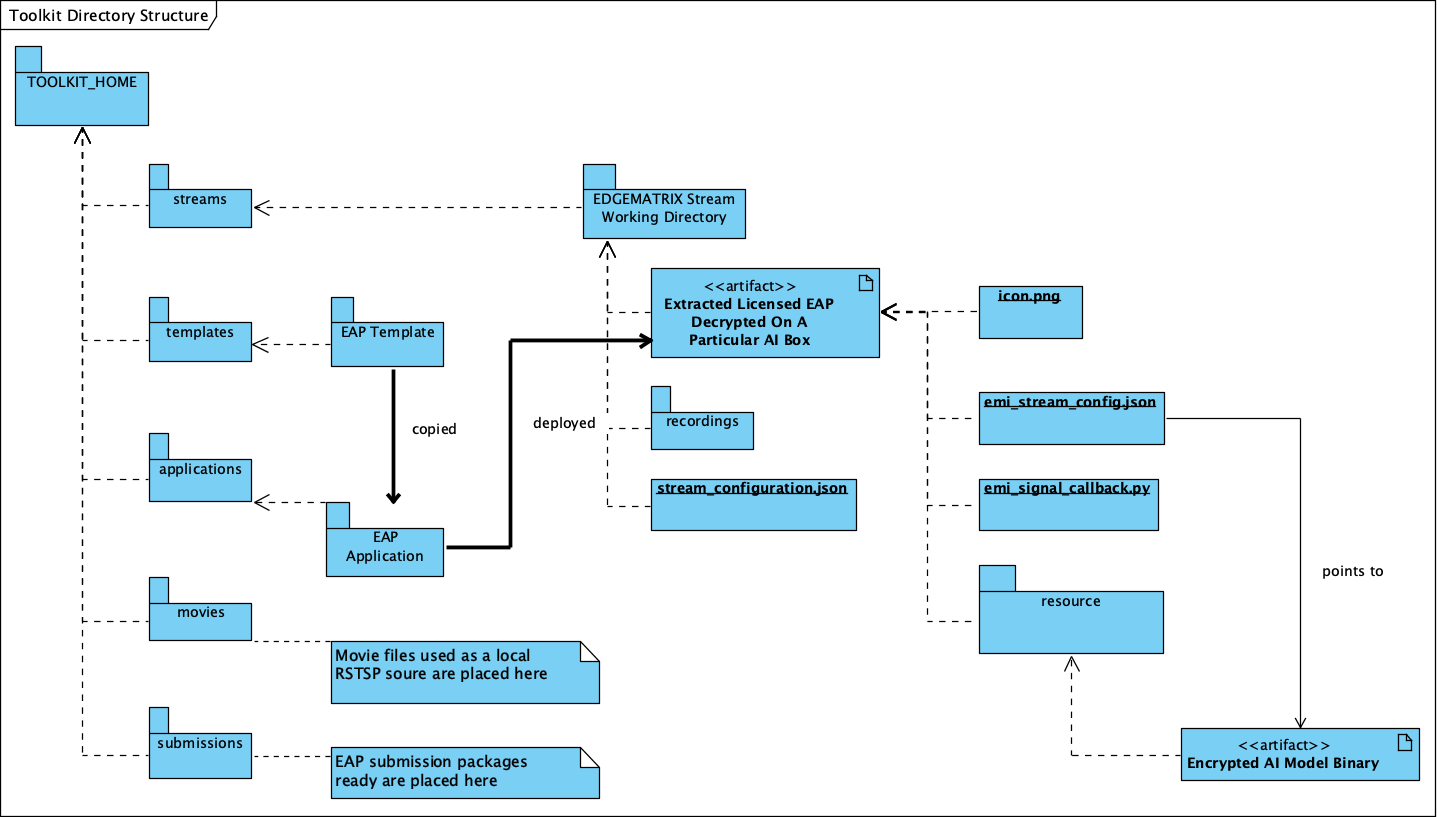
The directory structure of the EDGEMATRIX Stream Toolkit looks like this:
Configurations
Overview
This is a configuration about an overview of an EAP.
| Property | Meaning | Type |
|---|---|---|
| developer_name | The company name of an AI Model Developer | String |
| application_name | The name of an application. This has to be unique among all your applications. | String |
| application_version | The version name of your application. | String |
| application_description | The description of your application | String |
All the properties are mandatory.
Input
This is a configuration about an input of a pipeline.
The GStreamer element used for this is nvstreammux.
Available properties are:
| Property | Meaning | Type | Range | Default |
|---|---|---|---|---|
| batch-size | Maximum number of buffers in a batch | Unsigned Integer | 0 - 1024 | 0 |
| batched-push-timeout | Timeout in microseconds to wait after the first buffer is available to push the batch even if the complete batch is not formed. Set to -1 to wait infinitely | Integer | -1 - 2147483647 | -1 |
| width | Width of each frame in output batched buffer. This property MUST be set. | Unsigned Integer | 0 - 4294967295 | 0 |
| height | Height of each frame in output batched buffer. This property MUST be set. | Unsigned Integer | 0 - 4294967295 | 0 |
| enable-padding | Maintain input aspect ratio when scaling by padding with black bands. | Boolean | true - false | false |
| gpu-id | Set GPU Device ID | Unsigned Integer | 0 - 4294967295 | 0 |
| live-source | Boolean property to inform muxer that sources are live. | Boolean | true - false | false |
| num-surfaces-per-frame | Max number of surfaces per frame | Unsigned Integer | 1 - 4 | 1 |
| nvbuf-memory-type | Type of NvBufSurface Memory to be allocated for output buffers | Enum(GstNvBufMemoryType) | (0) nvbuf-mem-default: memory allocated, specific to particular platform. (4) nvbuf-mem- surface-array: Allocate Surface Array memory, applicable for Jetson | 0 |
| buffer-pool-size | Maximum number of buffers in muxer’s internal pool | Unsigned Integer | 0 - 1024 | 4 |
Please note that an end user is allowed to configure their own ROI over their RTSP stream.
Primary/Secondary
This is a configuration about a primary inference of a pipeline.
The GStreamer element used for this is nvinfer.
Available properties are:
| Property | Meaning | Type | Range | Default |
|---|---|---|---|---|
| unique-id | Unique ID for the element. Can be used to identify output of the element | Unsigned Integer | 0 4294967295 | 1 |
| process-mode | Infer processing mode | Enum GstNvInferProcessModeType |
|
1 |
| config-file-path | Path to the configuration file for this instance of nvinfer | String | “” | |
| infer-on-gie-id | Infer on metadata generated by GIE with this unique ID. Set to -1 to infer on all metadata. | Integer | -1 2147483647 | -1 |
| infer-on-class-ids | Infer on objects with specified class ids Use string with values of class ids in ClassID to set the property. e.g. 0:2:3 | String | “” | |
| model-engine-file | Absolute path to the pre-generated serialized engine file for the model. If using encription this is (required) | String | “” | |
| batch-size | Maximum batch size for inference | Unsigned Integer | 1 1024 | 1 |
| interval | Specifies number of consecutive batches to be skipped for inference | Unsigned Integer | 0 2147483647 | 0 |
| gpu-id | Set GPU Device ID | Unsigned Integer | 0 4294967295 | 0 |
| raw-output-file-write | Write raw inference output to file | Boolean | true false | false |
| raw-output-generated-callback | Pointer to the raw output generated callback funtion (type gst_nvinfer_raw_output_generated_callback in ‘gstnvdsinfer.h’) | Pointer | ||
| raw-output-generated-userdata | Pointer to the userdata to be supplied with raw output generated callback | Pointer | ||
| output-tensor-meta | Attach inference tensor outputs as buffer metadata | Boolean | true false | false |
| decrypt | Whether to decrypt or not the incoming files | Boolean | true false | false |
| decryption-passphrase | Passphrase to decrypt the model | String | “” |
The mandatory properties are the following.
- process-mode == 1 (Primary), 2 (Secondary)
- config-file-path
Note that model-engine-file property is a mandatory property, but can not be used here
because the property of nvinfer as a GStreamer plugin needs to be an absolute path.
When you need to generate an engine file, it can be generated by launching a simple GStreamer command involving nvinfer. Please refer to the forum post How to generate an engine file? (How to debug an app at the DeepStream level?).
So, please make sure to define in a config file of nvinfer as indicated by config-file-path.
Also note that config-file-path is the path to the configuration file for this instance of nvinfer. This configuration file contains some fields that can only be configured from there and some fields that overlap with nvinfer element properties enumerated before. Whenever a property is configured in both places, the one configured on the pipeline will take precedence and the one in the config file will be ignored.
Tracker
This is a configuration about a tracker of a pipeline.
The GStreamer used for this is nvtracker.
| Property | Meaning | Type | Range | Default |
|---|---|---|---|---|
| tracker-width | Frame width at which the tracker should operate, in pixels | Unsigned Integer | 0 - 4294967295 | 640 |
| tracker-height | Frame height at which the tracker should operate, in pixels | Unsigned Integer | 0 - 4294967295 | 368 |
| gpu-id | Set GPU Device ID | Unsigned Integer | 0 - 4294967295 | 0 |
| ll-config-file | Low-level library config file path | String | null | |
| ll-lib-file | Low-level library file path | String | null | |
| enable-batch-process | Enable batch processing across multiple streams? | Boolean | true - false | false |
The mandatory properties are the following.
- ll-config-file
- ll-lib-file
Overlay
This is a configuration about an overlay of a pipeline.
The GStreamer used for this is nvdsosd <https://docs.nvidia.com/metropolis/deepstream/plugin-manual/index.html#page/DeepStream_Plugin_Manual%2Fdeepstream_plugin_details.02.06.html>.
| Property | Meaning | Type | Range | Default |
|---|---|---|---|---|
| silent | Produce verbose output ? | Boolean | true - false | false |
| display-clock | Whether to display clock | Boolean | true - false | false |
| clock-font | Clock Font to be set | String | null | |
| clock-font-size | font size of the clock | Unsigned Integer. | 0 - 60 | 0 |
| x-clock-offset | x-clock-offset | Unsigned Integer. | 0 - 4294967295 | 0 |
| y-clock-offset | y-clock-offset | Unsigned Integer. | 0 - 4294967295 | 0 |
| clock-color | clock-color | Unsigned Integer. | 0 - 4294967295 | 0 |
| process-mode | Rect and text draw process mode | Enum “GstNvDsOsdMode” |
|
2, “HW_MODE” |
| gpu-id | Set GPU Device ID | Unsigned Integer. | 0 - 4294967295 | 0 |
AI Meta
This is a configuration about a signaling of inference result of a pipeline.
This GStreamer element is a priprietary one by EdgeMatrix, Inc.
Available properties are:
| Property | Meaning | Type | Range | Default |
|---|---|---|---|---|
| silent | silent | Boolean | true - false | true |
| last-meta | last-meta | String | null | |
| signal-aimetas | Send a signal when the json containing the meta is ready for read | Boolean | true - false | true |
| signal-interval | Interval (in buffers) between aimeta signal emissions | Integer | 1 - 2147483647 | 1 |
The only property available is signal-interval, and which is mandatory.
The signal-interval property is the interval between signals (in buffers). Change this property to reduce the frequency of emitted signals in non-critical applications.
Signal
The structure of a signal is defined as follows by example.
{# Holds batch information containing frames from different sources.
  "frame": [ # List of frame meta in the current batch
    {
      "frame_num": 0, # Current frame number of the source
      "buf_pts": 0, # PTS of the frame
      "timestamp": "2019-12-30T08:24:36.748-0600", # System timestamp when the buffer was received by the aimeta element
      "object": [ #L ist of object meta in the current frame
        {
          "class_id": 0, # Index of the object class infered by the primary detector/classifier
          "object_id": 65, # Unique ID for tracking the object. '-1' indicates the object has not been tracked
          "confidence": 0,# Confidence value of the object, set by inference component
          "rect_params": { # Structure containing the positional parameters of the object in the frame
            "left": 1722, # Holds left coordinate of the box in pixels
            "top": 601, # Holds top coordinate of the box in pixels
            "width": 192, # Holds width of the box in pixels
            "height": 166 # Holds height of the box in pixels
          },
          "text_params": { # Holds the text parameters of the overlay text
            "display_text": "Car 65 audi " # Holds the text to be overlayed
          },
          "classifier": [ # List of classifier meta for the current object
            {
              "num_labels": 1, # Number of output labels of the classifier
              "unique_component_id": 2, # Unique component id of the element that attached this metadata
              "label_info": [ # List of label meta of the current classifier
                {
                  "num_classes": 0, # Number of classes of the given label
                  "result_label": "audi", # String describing the label of the classified object
                  "result_class_id": 1, # Class id of the best result
                  "label_id": 0, # Label id in case of multi label classifier
                  "result_prob": 0.708984375 # Probability of best result
                }
              ]
            }
          ]
        }
      ]
    }
  ]
}
Callback and Events
This is a configuration about the callback function name and event definitions.
- signal_callback_function_name: The name of the callback function to call if the event conditions are satisfied.
- event_item_keys: The description of the type and format allowed for each item used in the action rules of the stream-configuration JSON file. The event item keys are composed by the following properties:
- key: The name of the item (obligatory).
- type: The type of the item (obligatory). Supported types:
string- options: The possible values the item could take (optional). This property is valid for
stringtype only.
- options: The possible values the item could take (optional). This property is valid for
number- min_value: The minimum float value the item could take (optional). This property is valid for
numbertype only. - max_value: The maximum float value the item could take (optional). This property is valid for
numbertype only.
- min_value: The minimum float value the item could take (optional). This property is valid for
Callback
The callback function defined as the callback function name must exist in a python file “called emi_signal_callback.py”.
This is a python file in which source code represents a signal callback function to be activated if the conditions defined in the stream-configuration file are satisfied.
The signal callback file must at minimum comply with the following conditions:
- The file must be named emi_signal_callback.py
- Must define a method with the name defined in the emi_stream_config.json signal_callback_function_name field
- The method must return two objects
- a dictionary array where each element of the array contains at least the fields defined in the emi_stream_config.json event_item_keys field. This array can also be empty.
- a debug string that can be used for debugging. Nothing will be logged if an empty string is retruned.
- The python file will be compiled and executed in a sandbox environment based on Restricted Python. The allowed and restricted Python functionalities are documented below.
Allowed:
Secure exceptions are allowed. But the signal callback handler will fail if an exception is raised in the callback function. Here is a list of the allowed exceptions:
    ArithmeticError
    AssertionError
    AttributeError
    BaseException
    BufferError
    BytesWarning
    DeprecationWarning
    EnvironmentError
    EOFError
    Exception
    FloatingPointError
    FutureWarning
    GeneratorExit
    ImportError
    ImportWarning
    IndentationError
    IndexError
    IOError
    KeyboardInterrupt
    KeyError
    LookupError
    MemoryError
    NameError
    NotImplementedError
    OSError
    OverflowError
    PendingDeprecationWarning
    ReferenceError
    RuntimeError
    RuntimeWarning
    StopIteration
    SyntaxError
    SyntaxWarning
    SystemError
    SystemExit
    TabError
    TypeError
    UnboundLocalError
    UnicodeError
    UnicodeWarning
    UserWarning
    ValueError
    Warning
    ZeroDivisionError
For loops are allowed when iterating over lists, tuples or strings.
Flow control statements are allowed:, break, continue, pass
Using format() on a str is not safe but it is allowed
The following built-in functions are allowed:
    abs()
    callable()
    chr()
    divmod()
    hash()
    hex()
    id()
    isinstance()
    issubclass()
    len()
    oct()
    ord()
    pow()
    range()
    repr()
    round()
    zip()
Module imports are potentially dangerous but the datetime package and all its sub-modules are allowed.
New classes, parameters, and methods are allowed
The following data types are allowed:
    bool
    complex
    float
    int
    slice
    str
    tuple
Only in-place operators are restricted. This is the list of allowed operators:
    +
    -
    *
    /
    %
    **
    //
    &
    |
    ^
    ~
    <<
    >>
    ==
    !=
    >
    <
    >=
    <=
    and
    or
    not
    is
    is not
    in
    not in
    =
The following builtin values are allowed:
    False
    None
    True
While loops are allowed
Restricted:
Attribute manipulation with builtin functions is restricted:
    setattr()
    getattr()
    delattr()
    hasattr()
Attribute names that start with "_" are restricted
compile() is restricted because it can be used to produce new unrestricted code
For loops are restricted when iterating over dict
dir() is restricted because it returns all properties and methods of an object
Direct IO is restricted:
    execfile()
    file()
    input()
    open()
    raw_input()
eval() calls are restricted
The following exceptions are restricted:
    BlockingIOError
    BrokenPipeError
    ChildProcessError
    ConnectionAbortedError
    ConnectionError
    ConnectionRefusedError
    ConnectionResetError
    FileExistsError
    FileNotFoundError
    InterruptedError
    IsADirectoryError
    ModuleNotFoundError
    NotADirectoryError
    PermissionError
    ProcessLookupError
    RecursionError
    ResourceWarning
    StandardError
    StopAsyncIteration
    TimeoutError
    UnicodeDecodeError
    UnicodeEncodeError
    UnicodeTranslateError
    WindowsError
exec() calls are restricted because it can be used to execute unrestricted code
The following built-in functions are restricted:
    all()
    any()
    apply()
    bin()
    buffer()
    classmethod()
    cmp()
    coerce()
    enumerate()
    filter()
    intern()
    iter()
    map()
    max()
    memoryview()
    min()
    sorted()
    staticmethod()
    sum()
    super()
    type()
    unichr()
Global built-ins access is restricted
All imports are restricted except the ones mentioned before
Namespace access is restricted:
    globals()
    locals()
    vars()
In-place operators are restricted:
    +=
    -=
    *=
    /=
    %=
    //=
    **=
    &=
    |=
    ^=
    >>=
    <<=
Prints are restricted
Strings that describe Python are restricted, there's no point to including these:
    copyright()
    credits()
    exit()
    help()
    license()
    quit()
Some data types alias are restricted:
    bytearray
    dict
    file
    list
    long
    unicode
    xrange
    basestring
    object
    property
Actions
An action is executed when an event matchs a user defined action rule.
The following actions are available on the EMI’s Edge AI Platform.
- Recording Action
- Upload to Amazon Kinesis Firehorse Action
- Send a LINE message/stamp Action
Record Action
The EDGEMATRIX Stream application implements the video recording module which records videos for each incoming event, this module is configured according to established actions into the stream configuration file.
The actions determine the video duration for:
Pre-recording: recorded video before triggering an event. Post-recording: recorded video after triggering an event.
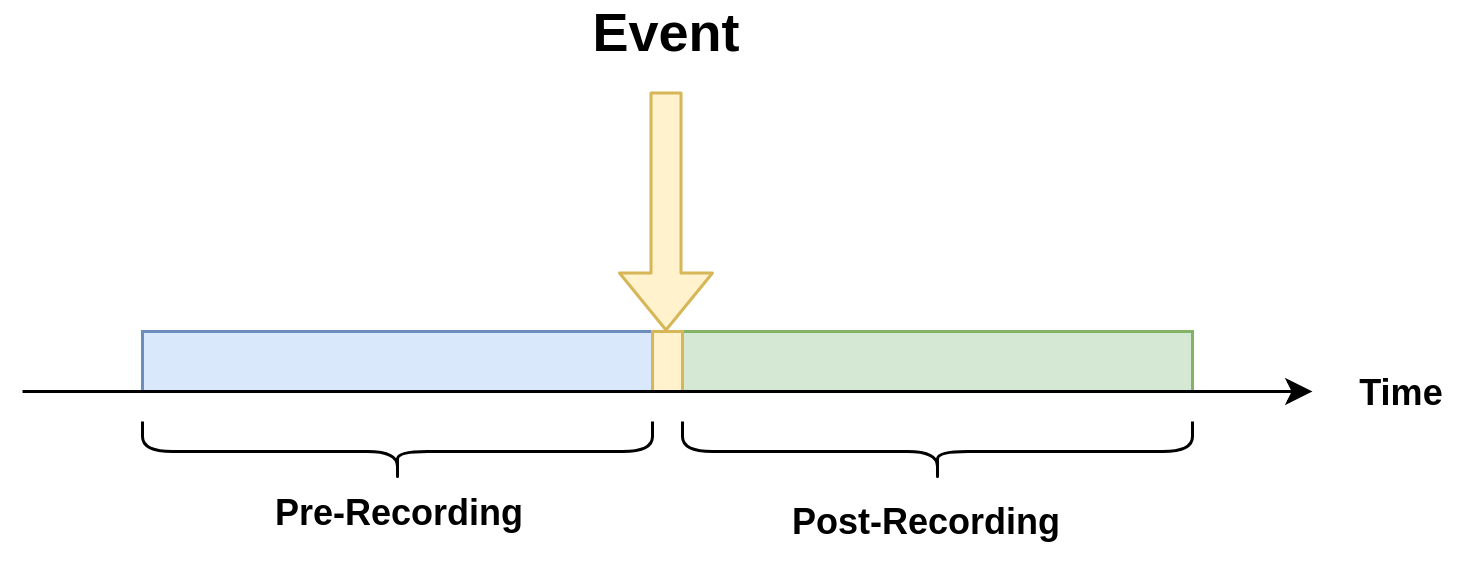
The videos for both recording processes will have the same duration.
Record action
This action establishes the duration of videos for pre-recording and post-recording equivalently. It must define as integer value.
"action":{
    "action_name": "record",
    "duration_in_seconds": 15
}
Video prolongation for post-recording
This recording module performs a video prolongation in post-recording for incoming events during the recording process. The video prolongation depends on the record time, defined in actions, and the time for each incoming event. The next figure shows how the video prolongation works.

- Tr = Record time
- T0 = Initial post-record by first event
- T1 = Arrival time for second event
- T2 = Arrival time for third event
- Tr - T1 = video prolongation by second event
- Tr - T2 = video prolongation by third event
Format name for recorded video:
stream_id_%ID_%Y-%m-%dT%H:%M:%S%z.mp4
- ID = Identifier
- Y = year
- m = month
- d = day
- H = hour
- M = minute
- S = seconds
- z = numeric time zone
Amazon Kinesis Firehorse Action
This is one of delegate actions executed by a Device Agent.
It will upload an event to a user defined location of the Amazon Kinesis Firehorse.
Here’s the format of such a configuration.
"action": {
  "action_name": "upload",
  "deliveryStreamName": "pedestrianStream",
  "accessKey": "",
  "secretKey": "",
  "region": ""
}
LINE Action
This is one of delegate actions executed by a Device Agent.
It will send a message and/or a stamp to a specified LINE talk room.
Here’s the format of such a configuration.
"action": {
    "action_name": "line",
    "token_id": "",
    "message": "",
    "stickerId": 0,
    "stickerPackageId": 0,
    "interval": 0
}
Please check the Notification section of the LINE Notify API Document .
HTTPS Action
This is one of delegate actions executed by a Device Agent.
It will make a post request with a basic authentication to a user defined location of a HTTPS server. The body content is a json event.
Here’s the format of such a configuration.
"action": {
  "action_name": "https",
  "url": "https://YOUR_HTTPS_SERVER/path",
  "user": "",
  "password": ""
}
SNMP Action
This is one of delegate actions executed by a Device Agent.
It will send a SNMP Trap to a user defined SNMP device.
Here’s the format of such a configuration.
"action": {
  "action_name": "snmp",
  "oid": "1.3.6.1.4.1.55412.1",
  "ipaddress": "IPADDRESS_OF_YOUR_SNMP_DEVICE",
  "port": 162,
  "var_bind_key": "VAR_BIND_KEY",
  "var_bind_value": VAR_BIND_VALUE,
  "community": "public",
  "interval": 0
}