Overview
Welcome to the EDGEMATRIX Stream Toolkit Tutorial.
As an overview, we’ll walk you through some basic concept and design you need to understand to build your own app.
- The concept of Edge AI
- EDGEMATRIX Service
- EDGEMATRIX Stream
- The development process using the EDGEMATRIX Toolkit
1. The concept of Edge AI
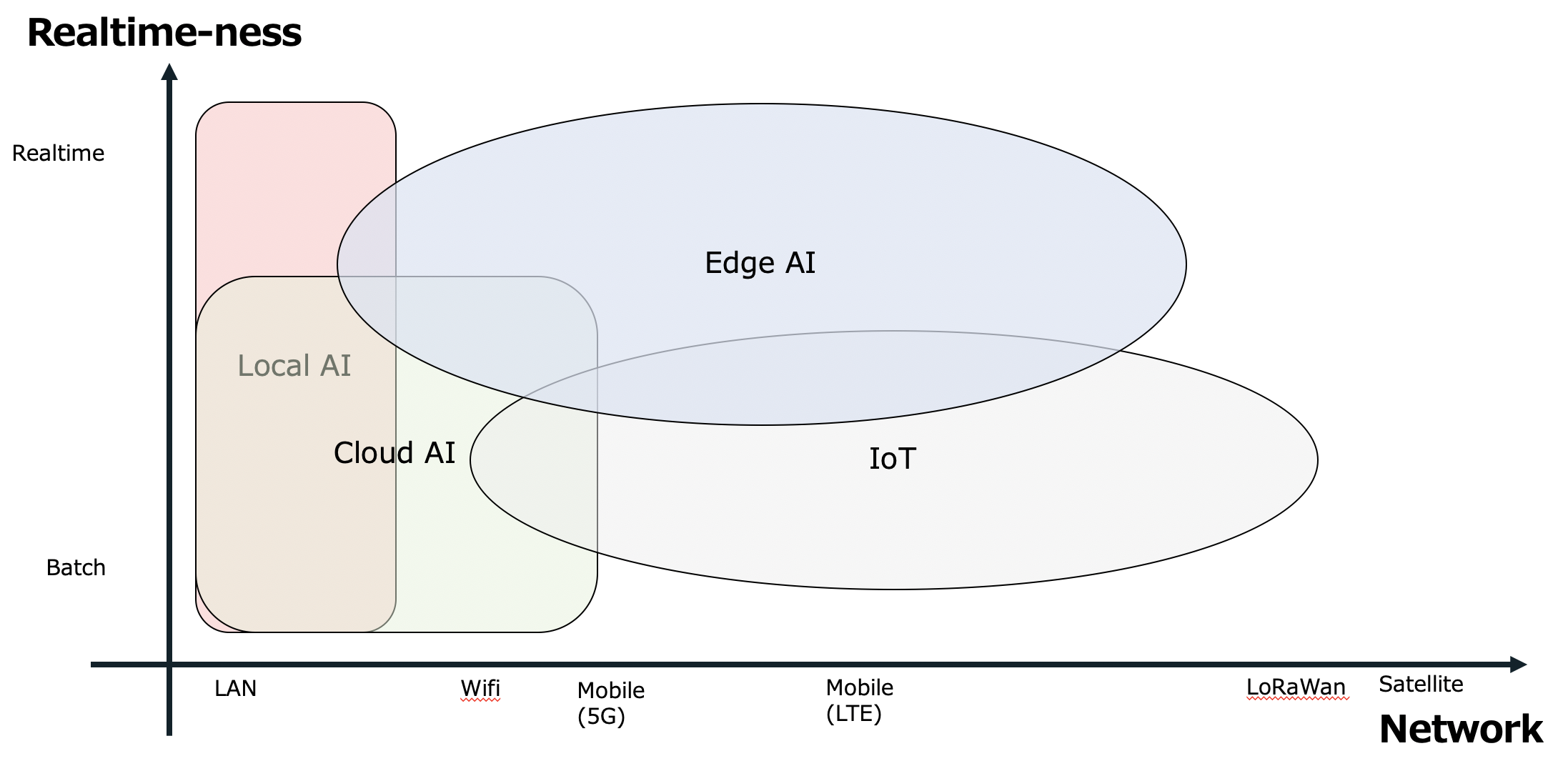
What do you come up with when you hear “Edge AI”? It could be a place where an AI is executed. It could mean a way how AIs interact with each other. In our concept, there is one unique axis, which is a type of Network where an AI is executed. This is loosely coupled with a location. As a range of Network becomes wider, it is more likely a location is outdoor and far from cities. Another axis is a common concept of “Edge AI”, Reatime-ness. As you can see, these are overlapped, but our core concept of “Edge AI” means an AI that is likely placed and executed outside and requires realtimeness.
2. EDGEMATRIX Service
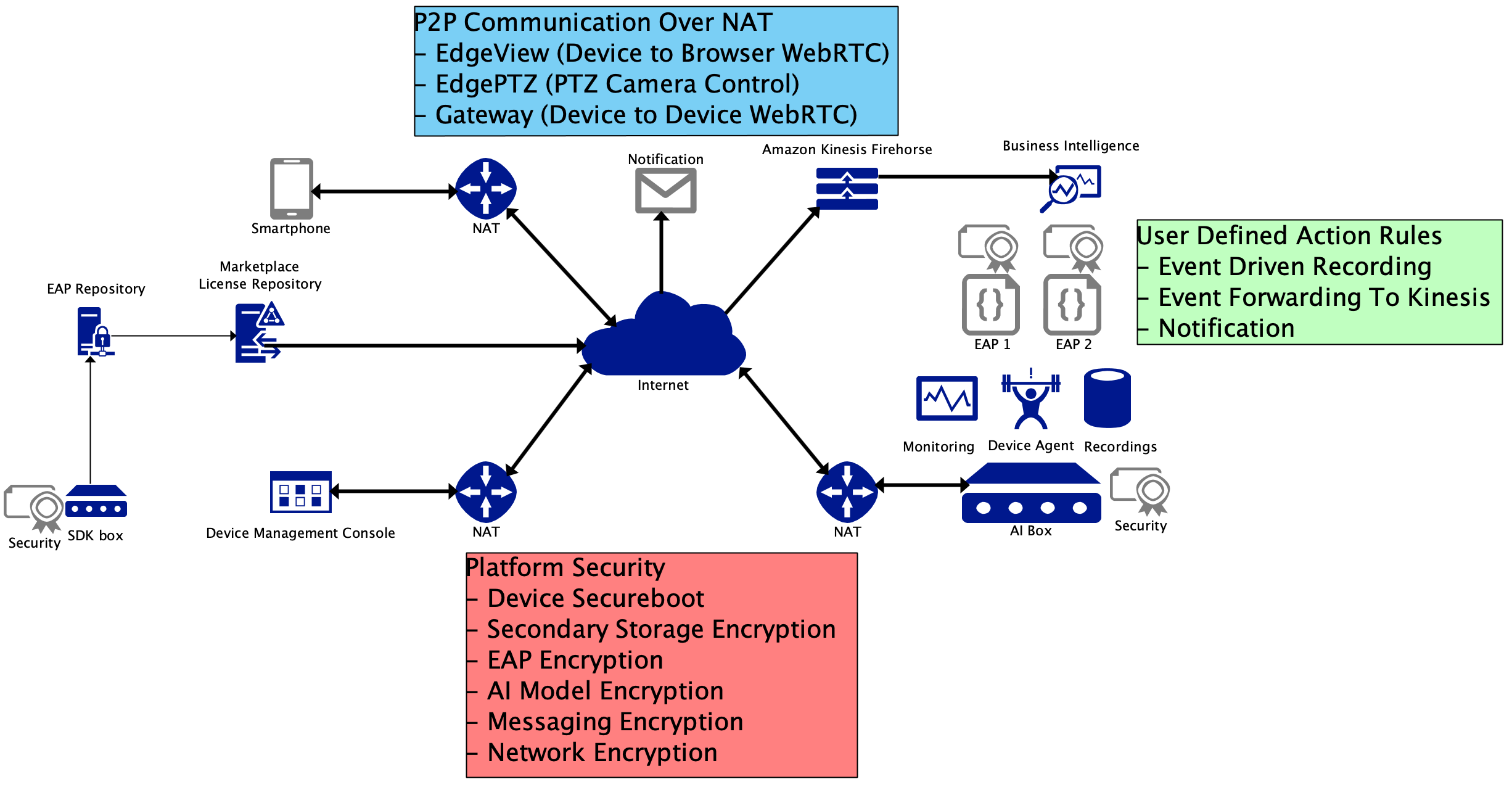
The EDGEMATRIX Service is an Edge AI Security Platform with the following features.
- Device Remote Management (OTA, EAP License, EAP Installation/Uninstallation, Device Status, Terminal Emulation)
- Security (Network Security, Device Authentication, Secondary Drive Encryption, EAP Encryption, AI Model Binary Encryption)
- EdgeView (WebRTC Realtime Stream even from a device behind a NAT [no public address])
NOTE: EAP stands for EDGEMATRIX stream Application Package
Please note that every AI Box and every client are placed behind NATs and interact with others by peer to peer. This is our assumption of the said “Edge AI” from the Network’s point’s of view.
Imagine a camera placed outdoor. This shouldn’t be difficult. Then, add an AI Box next to it. That’s where your app is executed! Such an AI Box is not exposed through a public address nor any open ports. But you and your end user still access to it to manage a device, streams (cameras), and installed apps. And it will notify end users of any events generated by your apps. Then, an end user can directly talk to a device to view a live or a recorded stream.
Does that sound nice? Good. You have your own trained model? Perfect, then, a Toolkit Box helps you build your own “Edge AI” app that we call EAP.
Toolkit Box
The Toolkit Box is a type of AI Box, which is used to build your own app with your precious trained model binary.
It comes with a GUI toolkit application with templates for you to start quickly. This tutorial is about the GUI toolkit software that allows you to make an EAP with your own precious trained model binary.
Before diving into the tutorial, core components running on “Edge AI” will be explained in the next section.
3. EDGEMATRIX Stream
The EDGEMATRIX Stream is the EMI’s core streaming engine that:
- works on the NVIDIA’s DeepStream GStreamer plugins
- is integrated with the EMI’s Edge AI Service
Here’s the picture of the EDGEMATRIX Stream’s concept.
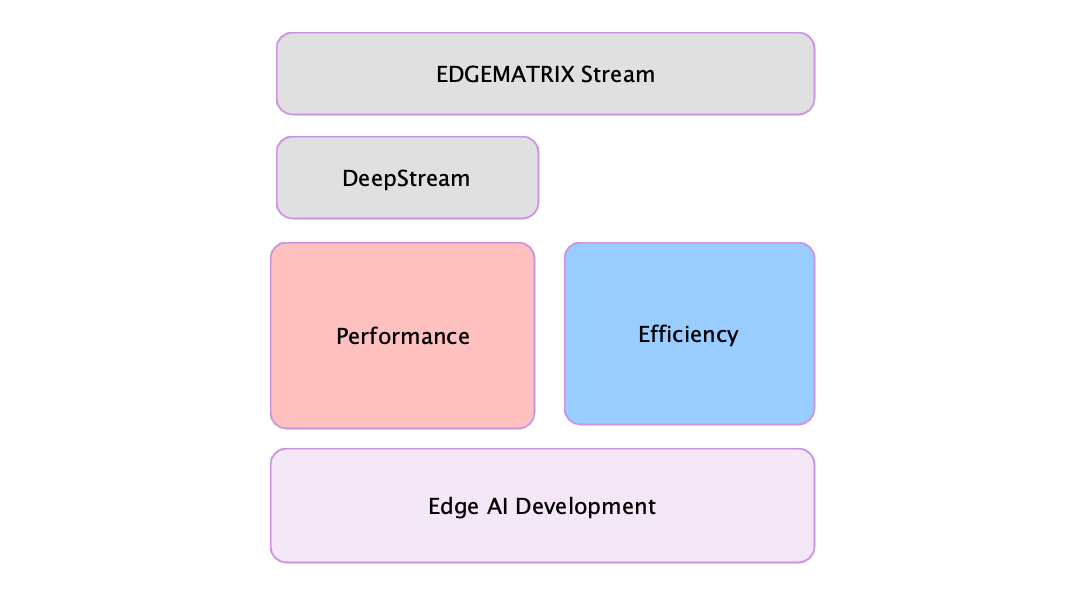
As you can see, the EDGEMATRIX Stream relies on the NVIDIA’s DeepStream about performance. Then, on top of it, the EDGEMATRIX Stream provides both of performance and efficiency over an Edge AI development.
GStreamer and DeepStream’s GStreamer plugins are development libraries so you can build your own pipeline. But a pipeline typically ends up with a fixed state of the art pipeline only works for a particular purpose. You’ll find exponentially it becomes complicated if you start adding more plugins to make it work for various scenarios. So, how is a pipeline of the EDGEMATRIX Stream designed to work in a flexible way? Here’s the picure of two typical pipelines.
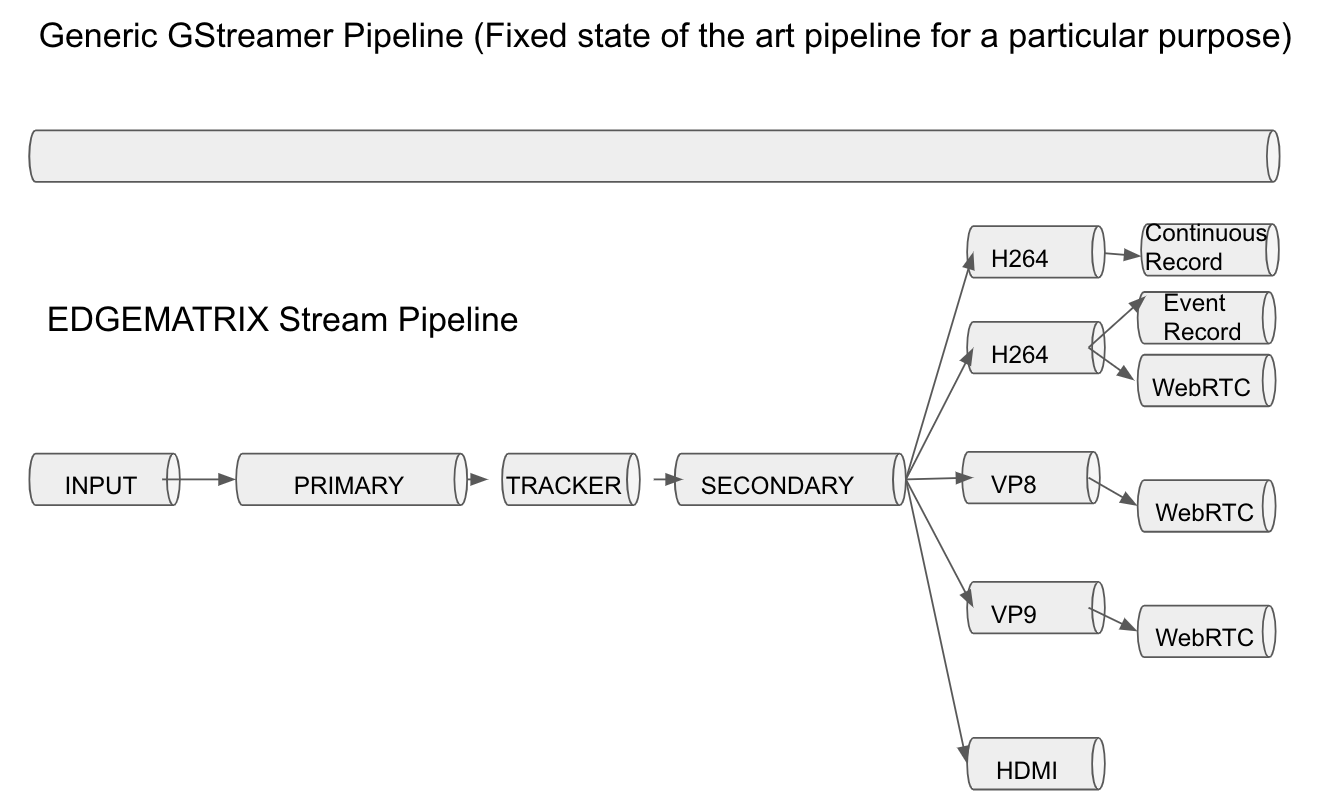
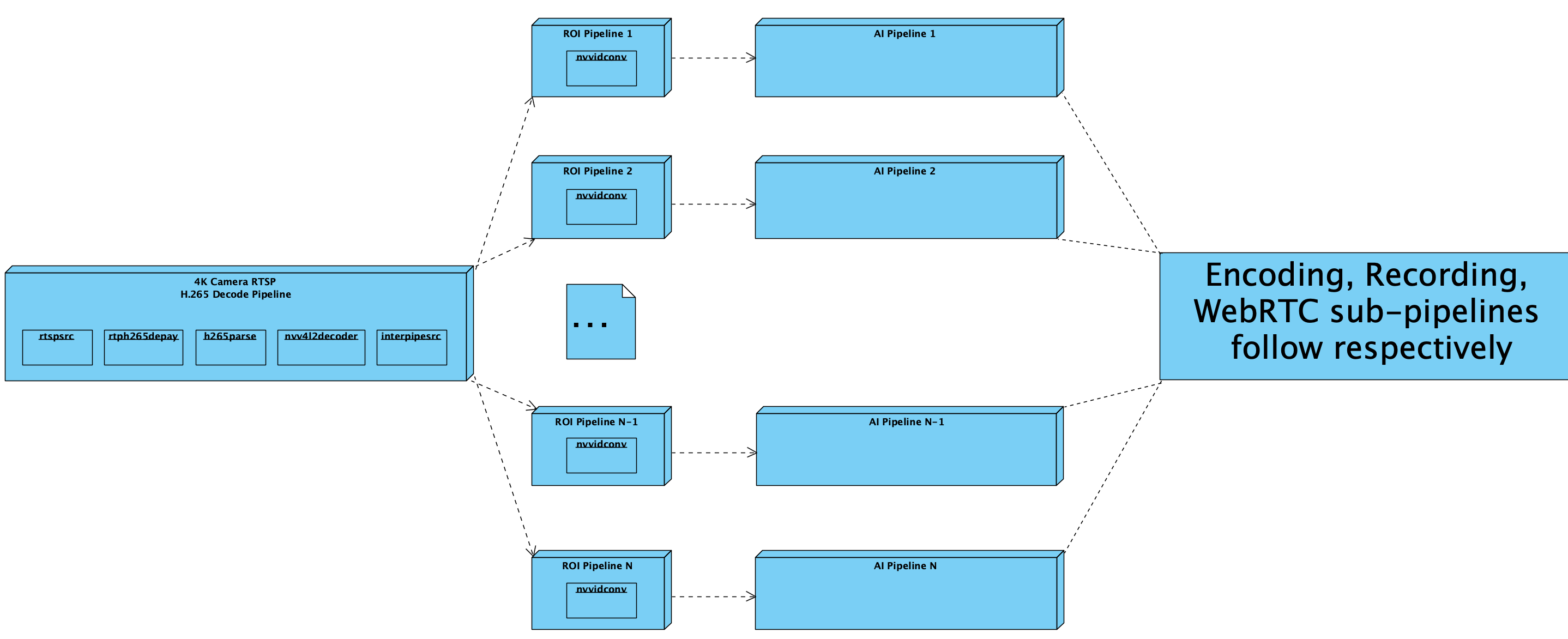
An pipeline of the EDGEMATRIX Stream consists of many sub pipelines and they are dynamically linked/unlinked as necessary. Also, each sub pipeline can be shared by multiple other sub pipeline for efficient processing line encoding and decoding. Even a sub pipeline, for example, an input pipeline from a RTSP stream, can be shared by two difference pipelines. This is the major design advantage why a pipeline of the EDGEMATRIX Stream can handle many tasks concurrently.
Next, here’s the component diagram of the EDGEMATRIX Stream.
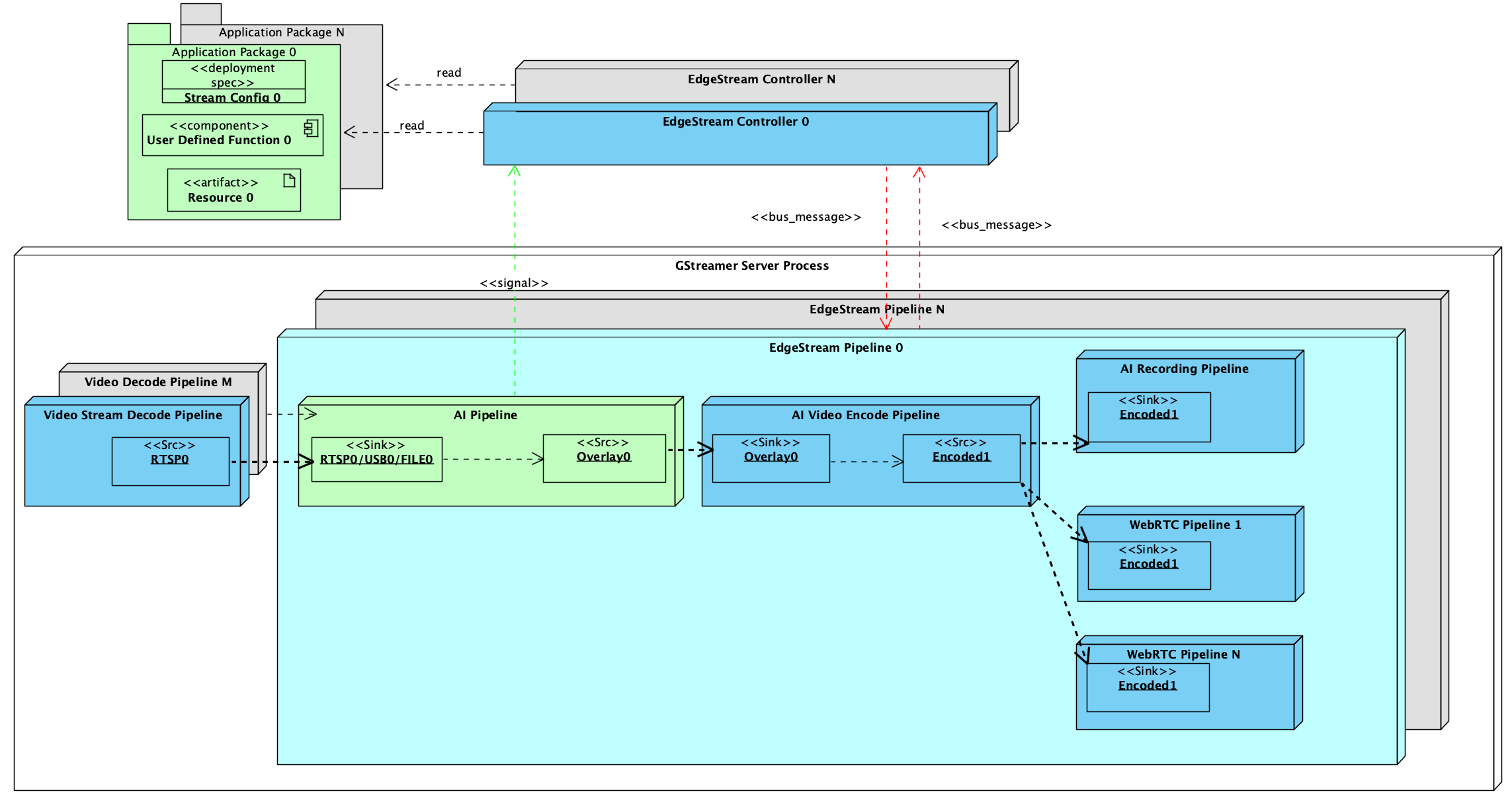
A single EDGEMATRIX Stream instance consists of three components.
- EDGEMATRIX Stream Application Package
- EDGEMATRIX Stream Controller
- EDGEMATRIX Stream Pipeline
EDGEMATRIX Stream Application Package
An EDGEMATRIX Stream Application Package (EAP) is an encrypted file with a public key of a licensed device that consists of the followings.
- A config file
- A Python file that contains a developer defined callback function
- A resource folder that contains any other files like an AI model binary
A stream config file contains not only various information about this application package, but also does event item definitions.
A callback function in a Python file is called back when a signal is generated from an EDGEMATRIX Stream pipeline, then generates events as defined in the event and options definitions.
A pipeline of the EDGEMATRIX Stream is constructed based on the information defined in a config file, by referring to files in a resource folder.
EDGEMATRIX Stream Controller
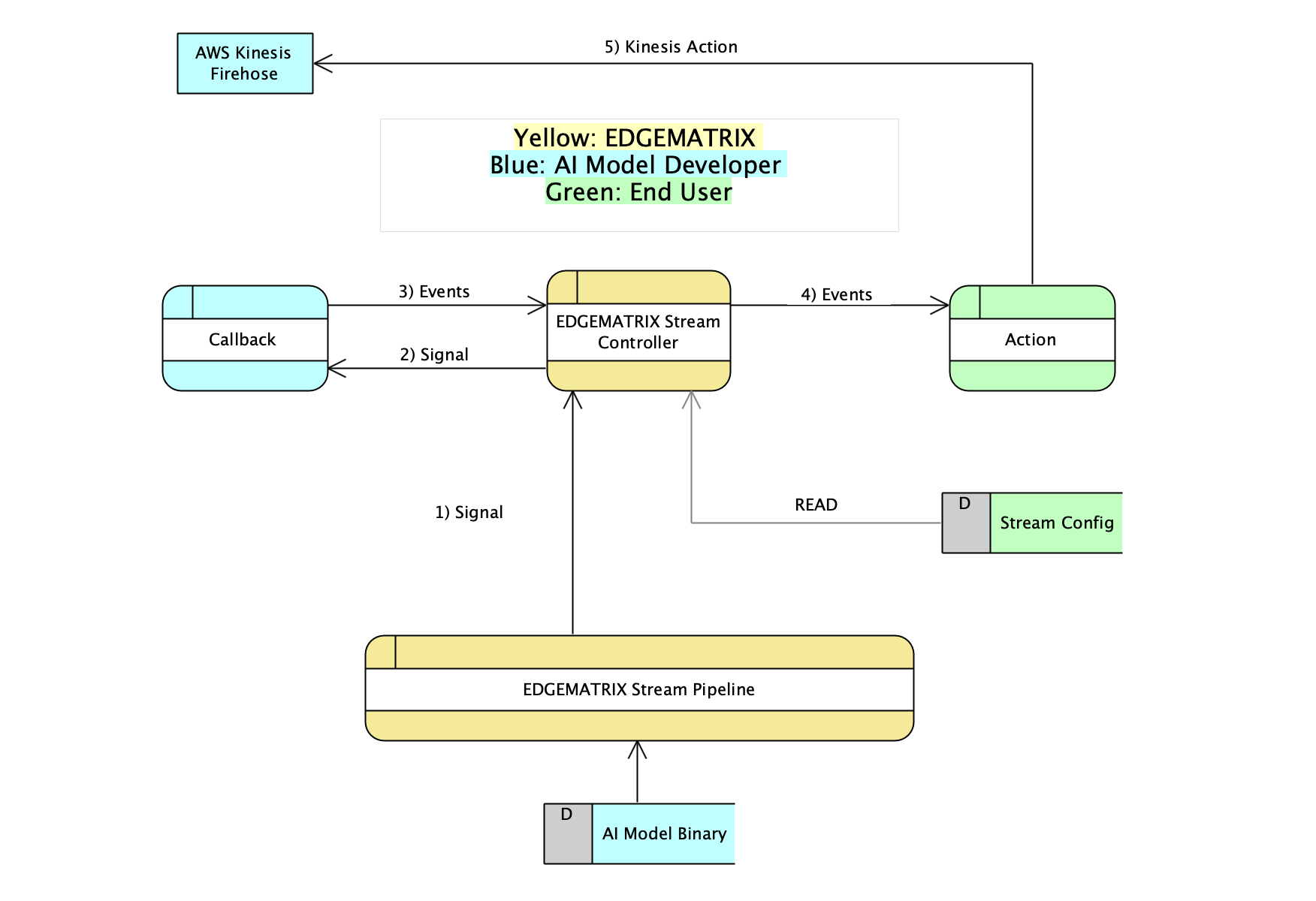
An EDGEMATRIX Stream Controller is a controller class that create a pipeline of the EDGEMATRIX Stream by reading a config file. Whenever a signal is generated, it calls a callback function, receive events, then execute an action if such an event matches to a condition defined by an end user.
What kind of event is generated is up to an application, but what action is executed is up to an end user.
So, an end user is allowed to define an action rule by using those events defined in a config file.
These interactions are illustrated as below.
EDGEMATRIX Stream Pipeline
A pipeline of the EDGEMATRIX Stream was explained above. But there is a GStremaer server process that runs multiple pipelines of the EDGEMATRIX Stream.
This is why an input sub pipeline can be shared by two different pipelines. It is based on one of our visionary pipelines as below.
A single 4K RTSP stream shared among several EDGEMATRIX Stream pipelines
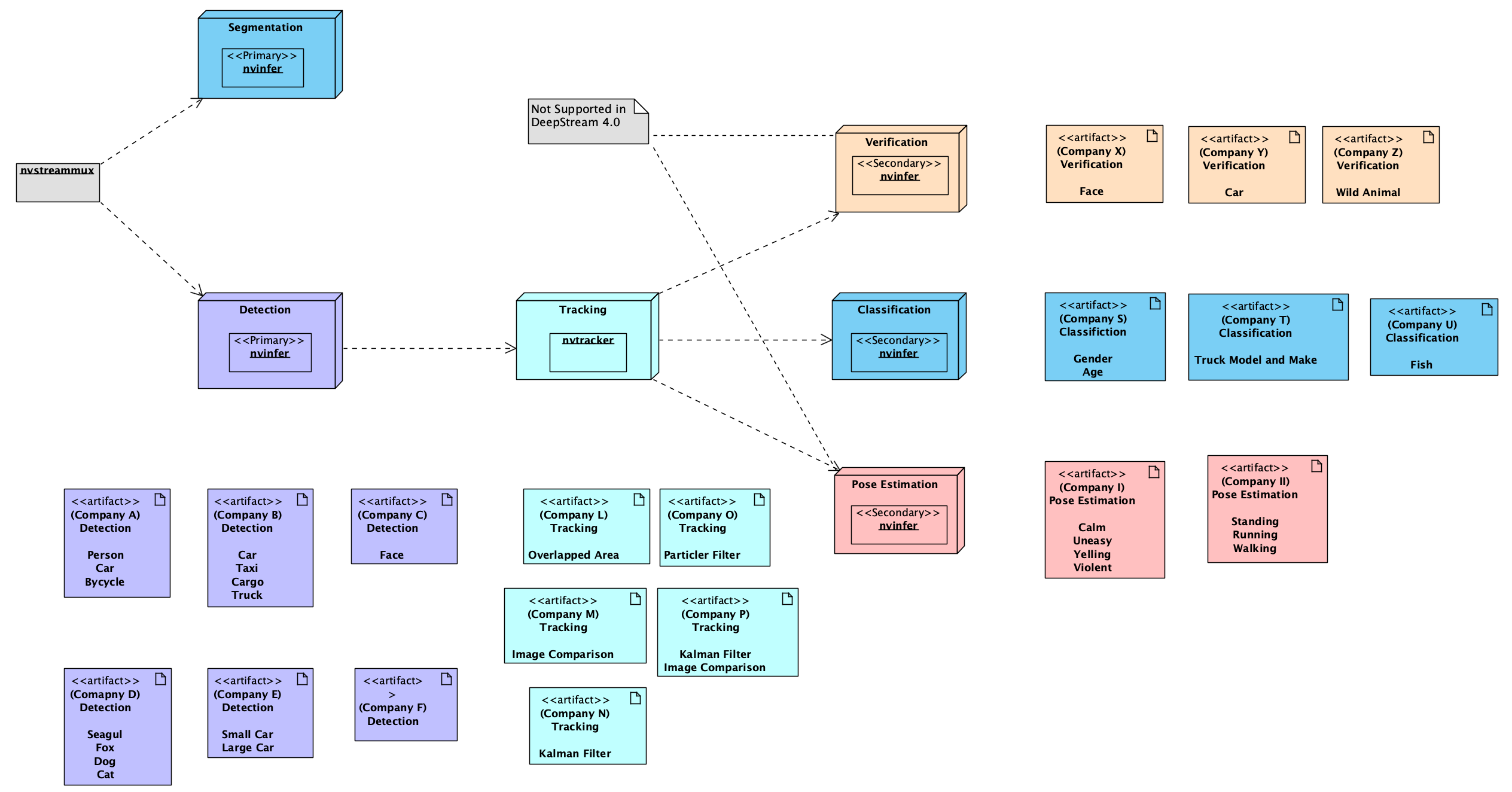
Also, we have another visionary pipelines that consists of various components provided by many vendors. This idea comes from the today’s problem that one vendor can not provide various trained models, but typically only a few. So, in order to meet various customer requirements, a pipeline would consists of many components provided by various vendors.
A single EDGEMATRIX Stream pipeline consists of multiple AI model developers
4. The development process using the EDGEMATRIX Toolkit
At the end of this chapter, here is a typical development process using the EDGEMATRIX Stream Toolkit.
- pick up your precious trained model binary (such a trained model binary should be trained with a decent amount of training data to cover most of possible variations for the task)
- convert the model binary to an engine file of TensorRT
- wrap it up as a GStreamer element called nvinfer to make it work in a pipeline
- run your trained model as a nvinfer in a simple GStreamer pipeline (use gst-launch)
- launch the Toolkit GUI application to make your own app as an EAP out of available templates
- design your events and options
- write your callback
- test your EAP with the Toolkit
- submit your EAP