Sample App - Parking Violation Detector
The problem that this sample app solves
Design Parking Violation Detector
- What actions should be taken under what conditions?
- How to let an end user to customize an action?
- How to let an end user to define a restricted area?
Prepare the pipeline
- AI model binaries and engine files
- Other elements
- DeepStream config
- Test the pipeline
Write a callback
- Define the structure of an event
- Generate an event
- Implementation
Write some action definitions to test
- SNMP Action
- LINE Action
- Recording Action
- HTTPS Action
This simple example will show a major use case of an Edge AI that works as follows:
- detects a danger or a violation in a restricted area
- immediatelly notifies people around the scene of such a danger or a violation
- sends an alert to a person in charge
- upload an incident to the cloud for analysis
Then, such a person in charge will check the scene by a record or a live streaming with the EdgeView from anywhere.
The problem that this sample app solves
A vehicle illegally parks in a restricted area often causes various issues in neighbors.
But if someone watches, such a vehicle would simply pass such an area.
The problem is that such a “someone” is not always there.
Design Parking Violation Detector
This app tries to play the role of the “someone” by detecting a vehicle staying around and sending some alerts that tells “you are watched”.
What actions should be taken under what conditions?
Action A) immediatelly notifies people around the scene of such a danger or a violation
The first thing we have to define is a condition when a vehicle is detected as the one attempting a parking violation. You could write a very complex algorithm for this, but for the simplicity, it is defined here that:
- at least one tracked vehicle stays in a restricted region for more than a particular amount of time in seconds (Ta)
The next thing to define is how to send an alert to such a vehicle. Here, it is sent by a light as well as a sound by using a signal.
A SNMP action is available for this purpose to trigger such an alert locally on site.
As an example, we use the following product by Patlite.
https://www.patlite.com/product/detail0000021465.html
Action B) sends an alert to a person in charge
We will use a LINE Action that sends a message of the popular chat service called LINE.
If the condition for the above Action A persists, that likely means a vehicle is attempting to park.
So its threshold is usually larger than the one for a detection, but such a configuration can be done by the same way as the Action A.
- an alert will be sent if at least one tracked vehicle stays in a restricted region for more than a particular amount of time in seconds (Tb >= Ta)
Action C) such a person in charge will check the scene by a record
We will use a Record Action that records a scene from X seconds before an event until X secnds after the event.
This threshold needs to be smaller than or equal to the one by Action B to record every notified scene.
- a scene will be recorded if at least one tracked vehicle stays in a restricted region for more than a particular amount of time in seconds (Tb >= Tc >= Ta)
Action D) upload an incident to the cloud for analysis
We will use a HTTPS Action to upload to the cloud.
If every event is uploaded to the cloud in a similar way as above, the number of requests could be too many. This is because an event is raised at each callback execution after at least one tracked vehicle stays in a restricted region for more than a particular amount of time in seconds.
For an analysis, an event when at least one vehicle enters a restricted region or a restricted region becomes empty is enough.
- an event when at least one vehicle enters a restricted region or a restricted region becomes empty
How to let an end user to customize an action?
Action A)
Depending on an end user (each deployment), the followings need to be customized.
- a threshold how much amount of time in seconds at least vehicle has stayed for in restricted areas to be detected as the one attempting a parking violation
- how to send a SNMP trap
- what kind of light pattern to send as an alert
- what kind of sound pattern to send as an alert
- when to disarm an alert
With the said product by Patlite, a pre-defined set of light and sound can be triggered by a particular SNMP Trap. So, we will define two pre-defined sets as follows.
- ON) c + d
- OFF) e (no light and no sound)
Then, under the condition a, a SNMP Trap of ON is triggered.
After a while, when the condition a is not met anymore (this means such a restricted area becomes empty), a SNMP Trap of Off is triggered to disarm an alert.
Action B)
Depending on an end user (each deployment), the followings need to be customized.
- a threshold how much amount of time in seconds at least one vehicle has stayed for in restricted areas to send an alert to a person in charge
- a LINE token of a particular chat room to send an alert
- a text message as an alert
- a stamp to send as an alert
Action C)
Depending on an end user (each deployment), the followings need to be customized.
- a threshold how much amount of time in seconds at least one vehicle has stayed for in restricted areas to record the scene
- how much amount of tiem in seconds to record both in before and after at the event of
i
For example, a record is being made if a vehicle has stayed for more than 3 seconds in restricted areas. And such a record begins 5 seconds before the event until 5 seconds later of it.
Action D)
Depending on an end user (each deployment), the followings need to be customized.
- url
- user name
- password
Note that in any case above, a Tracker could lose a vehicle time to time. Then, a tracking is reset, and will be started over.
How to let an end user to define a restricted area?
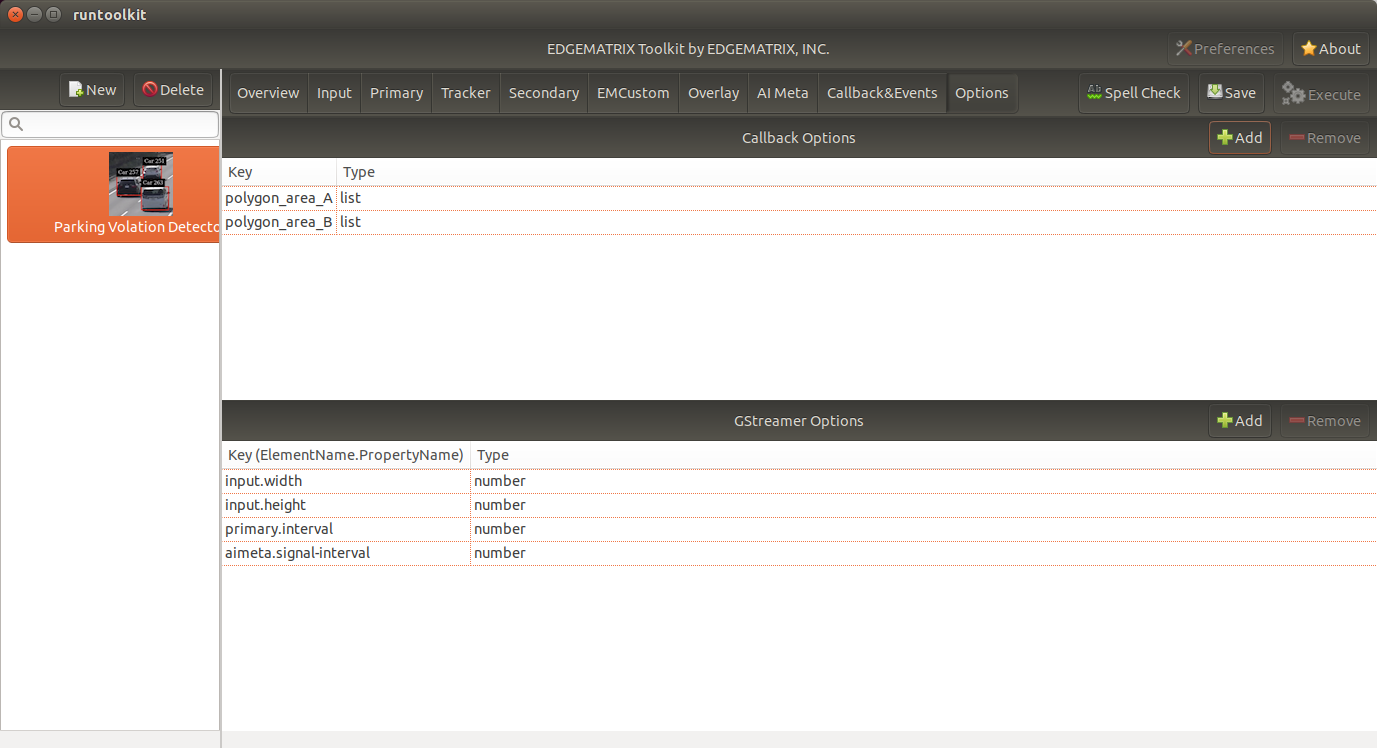
An end user is allowed to draw an arbitrary polygon on the Device Console if this sample app supports such a configuration in Options.
In this sample app, let’s define two such polygons in Options in order to allow an end user to define up to two restricted areas.
Prepare your pipeline
The pipeline of this app consists of the following elements:
- Primary Inference that detects a vehicle
- Tracker that identifies a vehicle
AI model binaries and engine files
For the primary inference, the AI model of the DeepStream reference app can be used.
That detects the following types of objects.
- Car
- Two Wheeler
- Person
- Roadsign
The eingine file can be generated by using the launch_dsconfig.sh script.
Other elements
For the tracker, the DCF Tracker from the DeepStream reference app can be used.
We don’t use a Secondary inference.
DeepStream config
We can reuse the DeepStream config file of the reference app.
Test the pipeline
At this point, we have everything we need to run a simple pipeline as an app.
It can be done again by using the launch_dsconfig.sh script.
But for convenience, let’s use one of the most relevant templates.
Template app
The most relevant reference app is the EMI Vehicle Counter.
Run prepare_resource.sh in the resource folder of the template, and create your app based on the template.
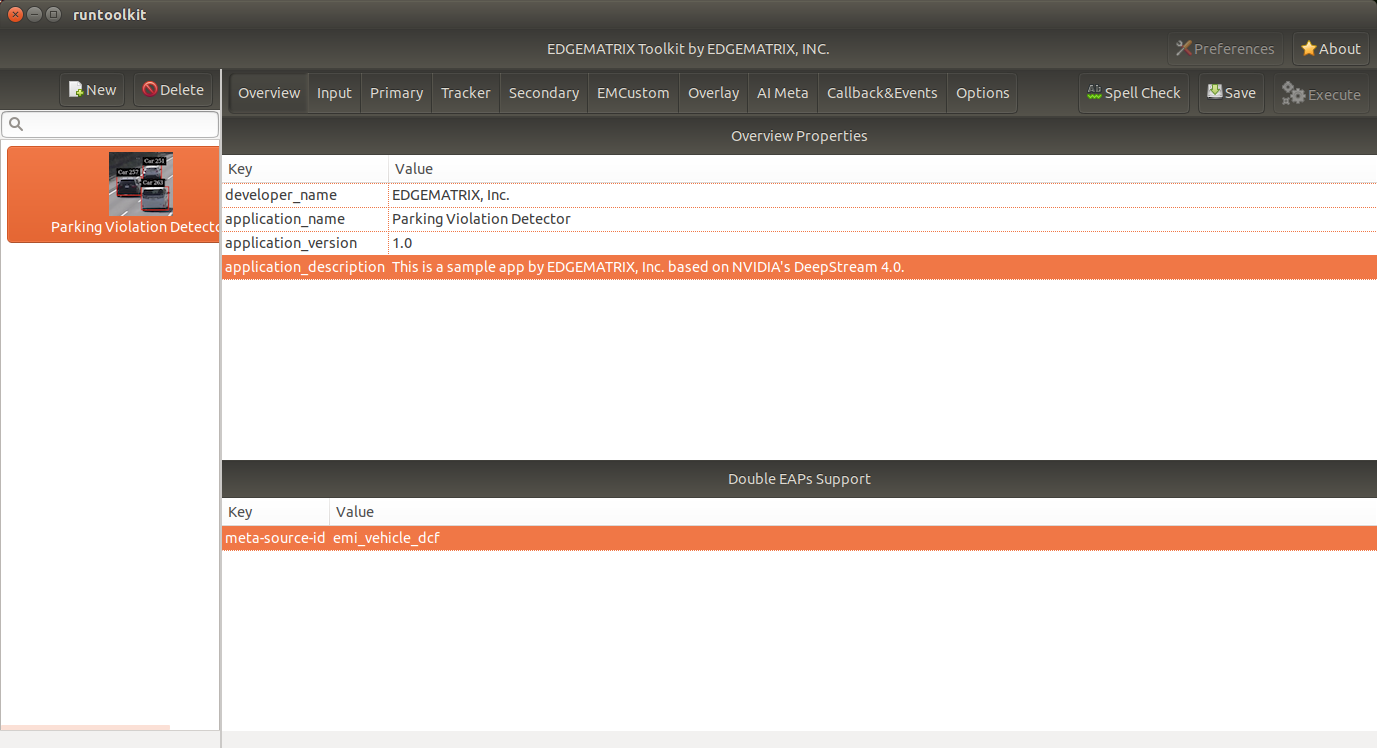
Then, engine files are generated, and pipeline will be tested with a simple gst-launch script.
Write a callback
The main goal of a callback is to generate an event from an inference result so that expected actions can be triggered by an end user.
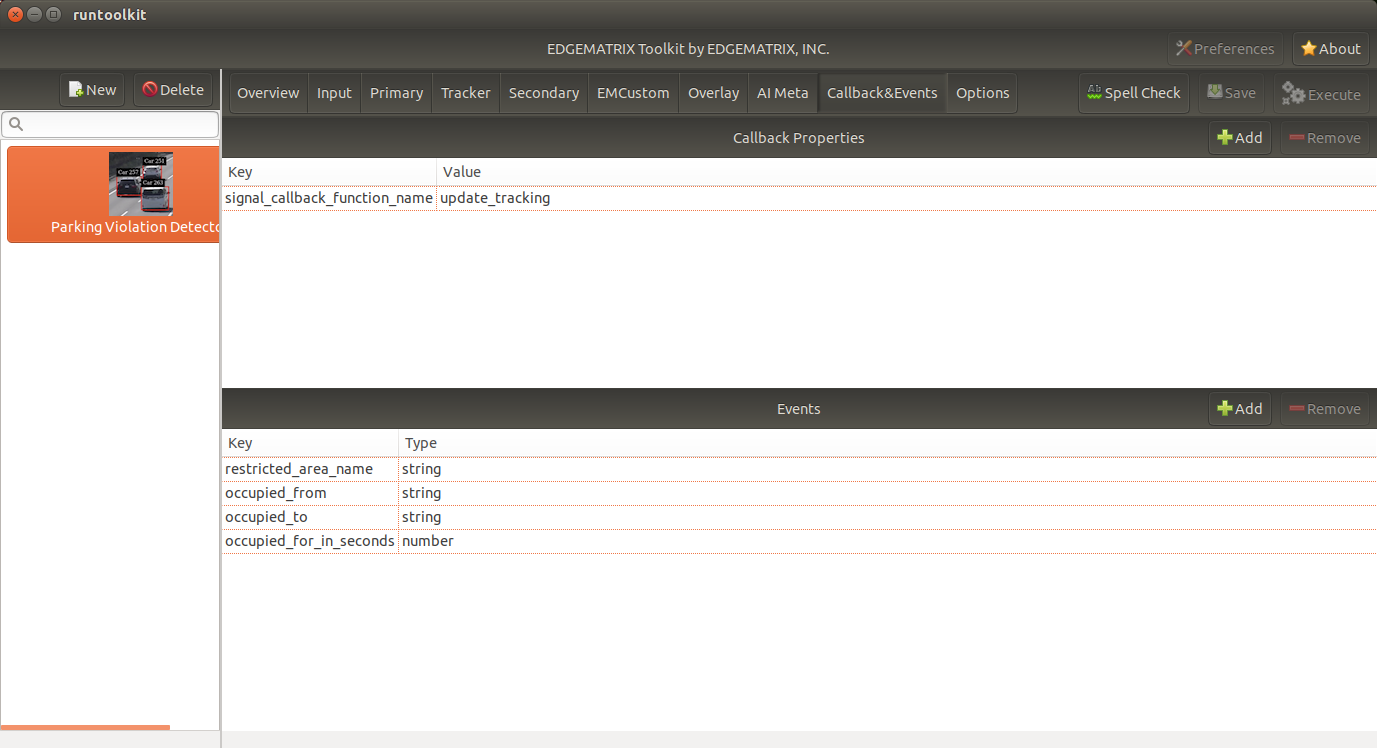
Define the structure of an event
For all of the Actions, the length that at least one vehicle has stayed for in a restricted region must be known by an event.
Also an event is generated when at least one vehicle enters into a restricted area or a restricted region becomes empty for an analysis in the cloud.
So, such an event is structured as follows:
- restricted_area_name: string
- occupied_from: string (timestamp)
- occupied_to: string (timestamp, “N/A” by default)
- occupied_for_in_seconds: number
Also, for Action A, a special event when a restricted region becomes empty must be generated to trigger an OFF trap.
This can be safely achieve by an event of the same event structure with a valid value on occupied_to.
Generate an event
It is not a car but an occupancy of a restricted area that is monitored. So, a callback will keep track of occipancies of restricted areas, then raises an event in the following three cases.
- at least one vehicle enters a restricted area
- at least one vehicle has stayed in a restricted area for more than a particular amount of time
- a restricted area becomes empty
One consideration here is that a callback does not know if an action is invoked or not.
An action is evaluated by a simple condition like occupied_for_in_seconds > 10.
So, an action will be keep being triggerred as long as the condition is met, which could be too many number of action invocations.
To solve this issue, some actions have a property called interval to invoke an action only at an interval of the interval seconds.
Both of SNMP Action and LINE Action have this property.
Implementation
from cv2 import pointPolygonTest
from datetime import datetime
from numpy import array

ISO_FORMAT = '%Y-%m-%dT%H:%M:%S.%f%z'

'''
Parking Violation Detector

Event Keys:
    restricted_area_name (string): Name of the restricted area
    occupied_from (string): Time when the restricted area is being occupied by at least one vehicle in UTC H:%M:%S
    occupied_to (string): Time when the restricted area becomes empty in UTC H:%M:%S
    occupied_for_in_seconds (number): Duration when the restricted are occupied by at least one vehicle

Options:
    polygon_area_A
    polygon_area_B

Recommended Action rules:
    SNMP: (ON) occupied_for_in_seconds > 10, (OFF) occupied_to != N/A
    LINE: occupied_for_in_seconds > 20
    Recording: occupied_for_in_seconds > 15
    HTTPS or Upload: (Start) occupied_for_in_seconds == 0, (Finish) occupied_to != N/A

'''
debug_string = ''
restrected_areas = None

class RestrictedArea:

    def __init__(self, key, points):
        self.raw_points = points
        self.pts = RestrictedArea.to_numpy_array(points)
        self.restricted_area_name = key

        # datetime
        self.occupied_from_datetime = None
        self.occupied_to_datetime = None

        # datetime
        self.last_updated_datetime = None

    def to_numpy_array(points):
        n_pts = len(points)
        pts = array(points)
        pts = pts.reshape((-1,n_pts, 2))
        return pts

    def status(self, timestamp):
        # occupied
        status = 2
        if self.occupied_from_datetime is None and self.last_updated_datetime is None:
            # empty
            status = 0
        elif self.occupied_from_datetime is None and self.last_updated_datetime is not None:
            # empty => occupied
            status = 1
        elif self.last_updated_datetime < RestrictedArea.iso_timestamp_to_datetime(timestamp):
            # occupied => empty
            status = -1
        return status

    def occupied_for_in_seconds(self):
        return (self.last_updated_datetime - self.occupied_from_datetime).total_seconds()

    def occupied_from(self):
        if self.occupied_from_datetime is None:
            return 'N/A'
        return self.occupied_from_datetime.strftime("%H:%M:%S")

    def occupied_to(self):
        if self.occupied_to_datetime is None:
            return 'N/A'
        return self.occupied_to_datetime.strftime("%H:%M:%S")

    def update(self, updated):
        self.last_updated_datetime = RestrictedArea.iso_timestamp_to_datetime(updated)

    def mark_occupied(self):
        self.occupied_from_datetime = self.last_updated_datetime

    def mark_empty(self, emptied_at):
        self.occupied_to_datetime = RestrictedArea.iso_timestamp_to_datetime(emptied_at)

    def reset(self):
        self.occupied_from_datetime = None
        self.occupied_to_datetime = None
        self.last_updated_datetime = None

    def to_event_item(self):

        event_item = {}
        event_item['restricted_area_name'] = self.restricted_area_name
        event_item['occupied_from'] = self.occupied_from()
        event_item['occupied_to'] = self.occupied_to()
        event_item['occupied_for_in_seconds'] = self.occupied_for_in_seconds()
        return event_item

    def iso_timestamp_to_datetime(timestamp):
        return datetime.strptime(timestamp, ISO_FORMAT)

def update_tracking(signal):
    """ a signal callback function """
    global debug_string
    if restrected_areas is None and 'options' in signal:
        initialize_options(signal['options'])
    detected_cars = []
    frame_list = signal["frame"]
    last_timestamp = None
    for frame in frame_list:
        timestamp = frame['timestamp']
        debug_string = debug_string + 'timestamp: ' + timestamp + '\n'
        for obj in frame["object"]:
            class_id = obj['class_id']
            object_id = obj['object_id']
            # Detect a car with class_id = 0
            if class_id != 0:
                # this is not a car
                continue
            if restrected_areas:
                check_area_entrance(obj["rect_params"], timestamp)
        last_timestamp = timestamp

    if restrected_areas:
        overlay = create_overlay()
        if overlay:
            signal.update({"custom-overlay": overlay})

    return generate_events(last_timestamp), debug_string

def initialize_options(config_options):
    global debug_string
    global restrected_areas
    restrected_areas = {}
    options = {}
    for option in config_options:
        options[option['key']] = option['value']
    for key in options:
        if not key.startswith('polygon'):
            continue
        restrected_areas[key] = RestrictedArea(key, options[key])
    debug_string = debug_string + '\noptions initialized: restrected_areas=' + str(restrected_areas)

def check_area_entrance(rect, timestamp):
    global debug_string
    # Rectangle params
    left = rect["left"]
    top = rect["top"]
    width = rect["width"]
    height = rect["height"]
    c_x = left + (width // 2)
    c_y = top + (height // 2)

    for restrected_area in restrected_areas.values():

        # Check if the center of the rectangle is inside the polygon:
        # -1: out of the polygon
        #  0: on the polygon's edge
        #  1: inside the polygon
        result = pointPolygonTest(restrected_area.pts, (c_x, c_y), False)
        inside = (result > 0)
        debug_string = debug_string + '\nrect at ' + str(rect) + ' is inside? ' + str(inside)

        if inside:
            restrected_area.update(timestamp)

def create_overlay():
    overlay_item = {}
    line_params = []
    for restrected_area in restrected_areas.values():
        # Draw the polygon on the frame with the following params:
        n_points = len(restrected_area.raw_points)
        for index in range(n_points):
            line = {}
            point_a = restrected_area.raw_points[index]
            if (index == (n_points - 1)):
                point_b = restrected_area.raw_points[0]
            else:
                point_b = restrected_area.raw_points[index + 1]
            line['x1'] = point_a[0]
            line['y1'] = point_a[1]
            line['x2'] = point_b[0]
            line['y2'] = point_b[1]
            line['line_color_red'] = 0
            line['line_color_green'] = 1
            line['line_color_blue'] = 0
            line['line_color_alpha'] = 1
            line['line_width'] = 5
            line_params.append(line)
    overlay_item['line_params'] = line_params
    return overlay_item

def generate_events(timestamp):
    events = []
    if not restrected_areas:
        return events
    for restrected_area in restrected_areas.values():
        status = restrected_area.status(timestamp)
        if status == 0:
            continue
        if status == -1:
            restrected_area.mark_empty(timestamp)
            events.append(restrected_area.to_event_item())
            restrected_area.reset()
        elif status == 1:
            restrected_area.mark_occupied()
            events.append(restrected_area.to_event_item())
        else:
            events.append(restrected_area.to_event_item())
    return events
Action Definitions
Here’re some examples to define such actions explained above.
SNMP Action
{
  "rule_name": "Alarm ON",
  "and": [
    {
      "key": "occupied_for_in_seconds",
      "operator": ">",
      "value": 10
    }
  ],
  "or": [
  ],
  "action": {
    "action_name": "snmp",
    "oid": "1.3.6.1.4.1.55412.1",
    "ipaddress": "192.168.1.134",
    "port": 162,
    "var_bind_key": "1.3.6.1.4.1.55412.1.1",
    "var_bind_value": 1,
    "community": "public",
    "interval": 5
  }
},
{
  "rule_name": "Alarm OFF",
  "and": [
    {
      "key": "occupied_to",
      "operator": "!=",
      "value": "N/A"
    }
  ],
  "or": [
  ],
  "action": {
    "action_name": "snmp",
    "oid": "1.3.6.1.4.1.55412.1",
    "ipaddress": "192.168.1.134",
    "port": 162,
    "var_bind_key": "1.3.6.1.4.1.55412.1.1",
    "var_bind_value": 0,
    "community": "public",
    "interval": 0
  }
}
LINE Action
{
  "rule_name": "Send a LINE message",
  "and": [
    {
      "key": "occupied_for_in_seconds",
      "operator": ">",
      "value": 20
    }
  ],
  "or": [
  ],
  "action": {
    "action_name": "line",
    "token_id": "MY_TOKEN",
    "message": "Test Message",
    "stickerId": 302,
    "stickerPackageId": 4,
    "interval": 60
  }
}
Recording Action
{
  "rule_name": "Vehicle Recording",
  "and": [
    {
      "key": "occupied_for_in_seconds",
      "operator": ">",
      "value": 15
    }
  ],
  "or": [],
  "action": {
    "action_name": "record",
    "duration_in_seconds": 3
  }
}
Upload Action
{
  "rule_name": "Upload Occupied Event",
  "and": [
    {
      "key": "occupied_for_in_seconds",
      "operator": "=",
      "value": 0
    }
  ],
  "or": [],
  "action": {
    "action_name": "upload",
    "deliveryStreamName": "trafficStream",
    "accessKey": "",
    "secretKey": "",
    "region": ""
  }
},
{
  "rule_name": "Upload Empty Event",
  "and": [
    {
      "key": "occupied_to",
      "operator": "!=",
      "value": "N/A"
    }
  ],
  "or": [],
  "action": {
    "action_name": "upload",
    "deliveryStreamName": "trafficStream",
    "accessKey": "",
    "secretKey": "",
    "region": ""
  }
}